
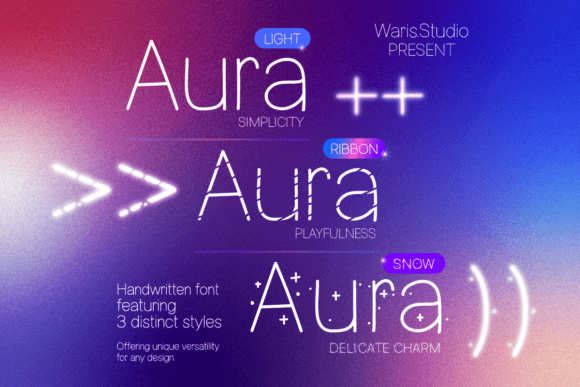
Aura Font: Unleash the Charm of Authentic Handwriting
In the world of typography, few fonts manage to capture the essence of authentic handwriting while offering versatility and elegance. Aura Font is one such exceptional find, designed to add a touch of personal sophistication to your creative projects. This comprehensive guide will explore the unique features of Aura, its various applications, and why it stands out as a must-have font for designers and creatives.
What is Aura Font?
Aura Font is a versatile font trio that brings the charm of genuine handwriting to your designs. Crafted with meticulous attention to detail, Aura offers three distinct and beautiful styles, each providing a unique visual appeal and endless design possibilities. Whether you’re working on branding, stationery, social media, or digital art, Aura brings a fresh and stylish aesthetic that sets your projects apart.
📸 Preview Images

💡 Click on any image to view full size
Key Features of Aura Font
- Three Distinct Styles: Aura offers three unique styles, each with its own character and charm. This variety allows you to choose the perfect fit for your project, whether you need something elegant and sophisticated or playful and whimsical.
- Authentic Handwriting Look: The font is designed to mimic authentic handwriting, giving your text a personal and human touch. This makes it ideal for projects where you want to connect with your audience on a more intimate level.
- High Versatility: Aura is incredibly versatile, making it suitable for a wide range of applications. From branding and stationery to social media graphics and digital art, Aura can elevate any project with its stylish and fresh aesthetic.
- Elegant and Readable: Despite its handwriting-like quality, Aura remains highly readable, ensuring that your message is conveyed clearly and effectively. This balance of style and readability makes it a practical choice for both headings and body text.
Applications of Aura Font
Aura’s versatility makes it suitable for various creative projects. Here are some of the key areas where Aura can make a significant impact:
Branding and Logo Design
Aura can be used to create elegant and memorable brand identities. Its handwriting-like quality adds a personal touch to logos, business cards, and letterheads, helping brands stand out with a unique and stylish aesthetic.
Stationery and Invitations
Elevate your stationery with Aura’s beautiful and sophisticated designs. Whether it’s wedding invitations, thank-you cards, or personal letters, Aura adds a touch of elegance and charm that makes your correspondence special.
Social Media Graphics
Aura can enhance your social media presence with stylish and engaging graphics. Use it for quotes, announcements, and promotional content to give your posts a fresh and trendy look that captures attention.
Digital Art and Illustration
For digital artists and illustrators, Aura can be a valuable addition to your toolkit. Incorporate it into your artwork to add text that complements your visuals and adds an extra layer of creativity and sophistication.
Why Choose Aura Font?
Choosing Aura Font for your projects comes with several advantages:
Unique and Personalized
Aura’s handwriting-like quality gives your text a unique and personalized feel, setting it apart from standard fonts and adding a human touch to your designs.
Versatile and Adaptable
With three distinct styles, Aura offers the flexibility to adapt to different design needs. Whether you’re creating something formal or casual, there’s an Aura style to suit your requirements.
High Readability
Despite its elegant and handwriting-like appearance, Aura remains highly readable. This ensures that your message is communicated clearly, making it suitable for both headings and body text.
Easy to Use
Aura is designed to be user-friendly. It can be easily integrated into your design workflow, allowing you to create stunning text without a steep learning curve.
How to Use Aura Font
Using Aura Font in your projects is straightforward. Here’s a step-by-step guide to get you started:
Download and Install
Begin by downloading the Aura Font files from a reliable source. Once downloaded, install the font on your computer or device. Most operating systems allow you to install fonts by right-clicking the font file and selecting “Install.”
Open Your Design Software
Open your preferred design software, such as Adobe Photoshop, Illustrator, or Canva. Create a new project or open an existing one where you want to use the Aura Font.
Select Aura Font
In your design software, select the text tool and choose Aura Font from the font dropdown menu. You can then pick one of the three styles that best suits your project.
Customize Your Text
Customize the size, color, and spacing of the text to match your design. Experiment with different styles and effects to enhance the appearance of your text.
Save and Export
Once you’re satisfied with your design, save your project and export it in the desired format. Whether it’s a PDF, PNG, or JPEG, ensure that the resolution and quality meet your needs.
Aura Font: Access Download Now
| Font Name | Aura Font |
| Author | Unknown |
| Download | Access Download Here |
Conclusion
Aura Font is a versatile and elegant font trio that brings the charm of authentic handwriting to your creative projects. With its three distinct styles, high readability, and wide range of applications, Aura is an excellent choice for designers and creatives looking to add a personal touch to their work. Whether you’re working on branding, stationery, social media, or digital art, Aura Font can elevate your designs and help you create visually stunning and impactful content.
Embrace the beauty of Aura Font and discover how it can transform your designs with its fresh and stylish aesthetic. Explore the possibilities with Aura today and make your creative projects stand out with the elegance and charm of authentic handwriting.
