
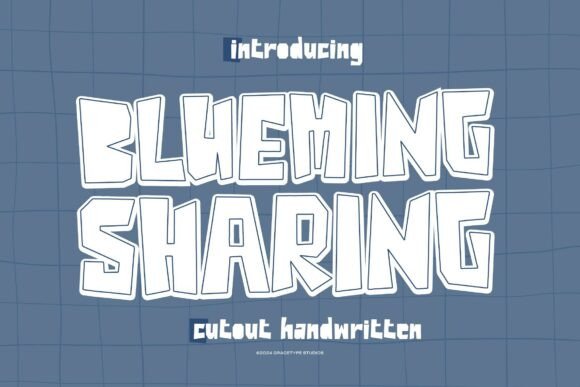
Blueming Sharing Font: A Handwritten Script with a Personal Touch
Are you looking for a font that can add a personal touch to your designs? Look no further than Blueming Sharing, a cutout handwritten script by Gracetypestudio. This font pairs lively handcrafted strokes with playful negative-space details, making it perfect for a wide range of design projects.
What Makes Blueming Sharing Unique?
Blueming Sharing is a unique font that stands out from the crowd with its casual rhythm and bold personality. Its handcrafted strokes and playful negative-space details give it a warm and inviting feel, making it perfect for designs that need a personal touch. Whether you’re creating logos, branding materials, product packaging, or homeware, Blueming Sharing is a natural fit.
📸 Preview Images


💡 Click on any image to view full size
Use Cases for Blueming Sharing
Blueming Sharing is a versatile font that can be used for a wide range of design projects, including:
- Logos and branding materials
- Product packaging and labels
- Homeware and mugs
- Quotes and posters
- Shopping bags and T-shirts
- Book covers and name cards
- Invitations and greeting cards
- Photography watermarks and special-event graphics
What You’ll Get with Blueming Sharing
When you purchase Blueming Sharing, you’ll get:
- Standard glyph set
- Alternates and ligatures
- PC and Mac compatibility
- Simple installation
- Compatibility with Adobe Illustrator, Photoshop, InDesign, Microsoft Word, and more
- PUA-encoded characters for full access without extra software
- Multilingual support
Why Choose Blueming Sharing?
There are many reasons why Blueming Sharing is a great choice for your design projects. Here are a few:
- Unique and eye-catching: Blueming Sharing is a one-of-a-kind font that will make your designs stand out from the crowd.
- Versatile: This font can be used for a wide range of design projects, from logos and branding materials to product packaging and homeware.
- Easy to use: Blueming Sharing is simple to install and use, even if you’re not a design expert.
- High-quality: This font is designed with high-quality craftsmanship, ensuring that it will look great in any design project.
Tips for Using Blueming Sharing
Here are a few tips for getting the most out of Blueming Sharing:
- Experiment with different sizes and colors: Blueming Sharing looks great in a variety of sizes and colors, so don’t be afraid to experiment and find the look that works best for your design.
- Pair it with other fonts: Blueming Sharing can be paired with other fonts to create a unique and eye-catching design.
- Use it for headlines and titles: This font is perfect for headlines and titles, where its bold personality can really shine.
Blueming Sharing Font: Access Download Now
| Font Name | Blueming Sharing Font |
| Author | Unknown |
| Download | Access Download Here |
Conclusion
Blueming Sharing is a unique and versatile font that can add a personal touch to any design project. With its handcrafted strokes, playful negative-space details, and bold personality, it’s perfect for logos, branding materials, product packaging, homeware, and more. Whether you’re a design expert or just starting out, Blueming Sharing is a great choice for anyone looking to create high-quality designs.
FAQs
Q: What file formats does Blueming Sharing come in?
A: Blueming Sharing comes in a variety of file formats, including OTF, TTF, and EOT.
Q: Can I use Blueming Sharing for commercial projects?
A: Yes, Blueming Sharing is licensed for commercial use, so you can use it for any project that generates revenue.
Q: Is Blueming Sharing compatible with my design software?
A: Blueming Sharing is compatible with a wide range of design software, including Adobe Illustrator, Photoshop, and InDesign, as well as Microsoft Word.
