
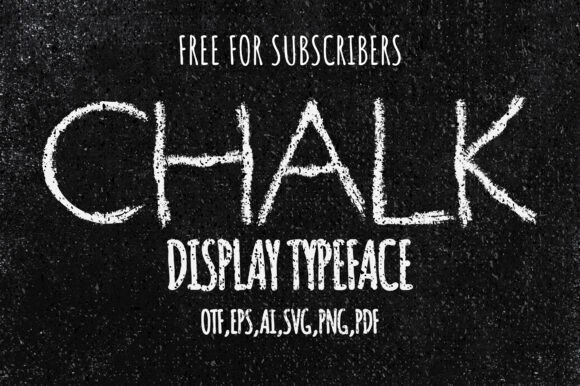
Introducing Chalk Font: A Unique Decorative Font with a Chalk/Charcoal Effect
Are you looking for a font that can add a touch of creativity and uniqueness to your designs? Look no further than the Chalk Font, a decorative font designed to help you generate 62 glyphs with a stunning chalk/charcoal effect. In this article, we’ll explore the features and benefits of this digital product, and how it can elevate your design game.
What is Chalk Font?
Chalk Font is a one-of-a-kind, decorative font that mimics the look of chalk or charcoal strokes. It’s perfect for designers, artists, and crafty individuals who want to add a personal touch to their work. The font comes with 62 glyphs, which include letters, numbers, and special characters, all designed to give your text a beautiful, hand-drawn look.
What’s Included with Chalk Font?
When you purchase Chalk Font, you’ll receive a comprehensive package that includes:
- 1 OTF (OpenType Font) file
- 62 PDFs (one for each glyph)
- 62 EPS (Encapsulated PostScript) files
- 62 PNG (Portable Network Graphics) files
- 1 AI (Adobe Illustrator) file
This extensive collection of files ensures that you have everything you need to incorporate the Chalk Font into your designs, regardless of the software or platform you’re using.
Features of Chalk Font
So, what makes Chalk Font so special? Here are just a few of its key features:
- Unique Chalk/Charcoal Effect: The font’s chalk/charcoal effect gives it a distinctive, hand-drawn look that’s perfect for adding a touch of personality to your designs.
- 62 Glyphs: With 62 glyphs at your disposal, you can create a wide range of designs, from simple text-based graphics to complex, intricate artwork.
- High-Quality Files: The included files are high-resolution and versatile, making it easy to use them in various design applications.
- Digital Product: As a digital product, Chalk Font is easy to download and use, with no physical items to ship or store.
Benefits of Using Chalk Font
So, why should you choose Chalk Font for your design projects? Here are just a few benefits of using this unique font:
- Adds a Personal Touch: The chalk/charcoal effect gives your designs a personal, hand-drawn look that’s sure to stand out.
- Increases Creativity: With 62 glyphs at your disposal, you can experiment with different designs and styles, pushing the boundaries of your creativity.
- Versatile: The font’s versatility makes it suitable for a wide range of design applications, from branding and advertising to packaging and more.
- Easy to Use: The included files are easy to download and use, making it simple to incorporate Chalk Font into your design workflow.
How to Use Chalk Font
Using Chalk Font is easy, even if you’re not a seasoned designer. Here are a few tips to get you started:
- Download and Install: Simply download the font files and install them on your computer.
- Choose Your Software: Open your preferred design software, such as Adobe Illustrator or Photoshop.
- Select the Font: Choose Chalk Font from your font library and start typing.
- Experiment with Glyphs: Try out different glyphs and characters to add variety to your designs.
Chalk Font: Access Download Now
| Font Name | Chalk Font |
| Author | Unknown |
| Download | Access Download Here |
Conclusion
Chalk Font is a unique and versatile decorative font that’s perfect for designers, artists, and crafty individuals looking to add a personal touch to their work. With its stunning chalk/charcoal effect, 62 glyphs, and comprehensive file package, this digital product is sure to elevate your design game. Whether you’re working on a branding project, creating artwork, or simply looking for a new font to experiment with, Chalk Font is an excellent choice.
Frequently Asked Questions
- Q: What is Chalk Font?
A: Chalk Font is a decorative font designed to mimic the look of chalk or charcoal strokes, with 62 glyphs and a comprehensive file package. - Q: What file types are included?
A: The package includes 1 OTF file, 62 PDFs, 62 EPS files, 62 PNG files, and 1 AI file. - Q: How do I install the font?
A: Simply download the font files and install them on your computer, then select the font in your preferred design software.
