
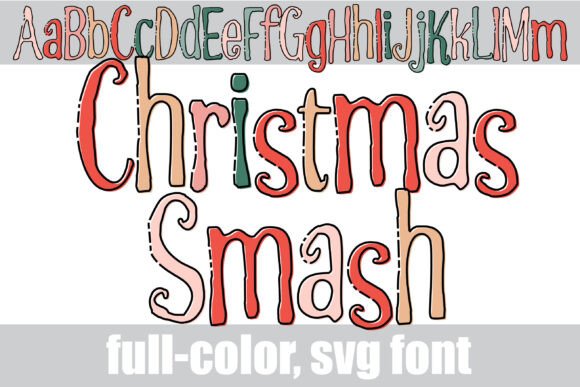
Introducing the Magical Christmas Smash Font: Elevate Your Holiday Designs
The holiday season is upon us, and what better way to get into the festive spirit than with a unique and eye-catching font? Look no further than the Christmas Smash Font, a hand-crafted, full-color font that is sure to add a touch of personality to your designs. In this article, we’ll take a closer look at the features and benefits of this amazing font, as well as provide guidance on how to install and use it.
Key Features of the Christmas Smash Font
- Hand-crafted design: Each letter has been carefully crafted to create a unique and festive look.
- Thin black outline: The font features a thin black outline filled in with a vibrant Christmas color palette.
- Alt version with additional colors: An alternative version of the font is available through your system’s character map, featuring additional colors for all letters.
- Perfect for titles, displays, and posters: The Christmas Smash Font is ideal for creating eye-catching titles, displays, and posters for the holiday season.
Compatibility and Installation
The Christmas Smash Font is compatible with a range of programs, including Silhouette Studio, Adobe products, Quark, and Inkscape. Installation is straightforward and can be done via FontBook for Mac users or through your preferred font manager or Control Panel in Windows.
Installing OpenType Full-Color (SVG) Fonts
OpenType full-color (SVG) fonts, like the Christmas Smash Font, are installed in the same way as normal .otf fonts. Here’s how:
- Mac users: Use FontBook to install the font.
- Windows users: Use your preferred font manager or Control Panel to install the font.
Color Font Support
Please note that color fonts will show as black in non-compatible programs. However, if your program supports color fonts, you’ll be able to see the full range of colors when you type on the document.
Programs that Support Full-Color SVG Fonts
- Adobe products
- Silhouette Studio
- Quark
- Inkscape
- And many more
The Benefits of Using Full-Color SVG Fonts
Full-color SVG fonts, like the Christmas Smash Font, offer a range of benefits for designers. Here are just a few:
- Add personality to your designs: With a wide range of colors and styles to choose from, you can create unique and eye-catching designs.
- Create complex illustrations: SVG fonts are vector-based, making it easy to create complex illustrations that can be scaled to any size without losing quality.
- Perfect for logos and text: SVG fonts are ideal for creating simple text logos or adding a touch of personality to your text.
Tips for Using the Christmas Smash Font
Here are a few tips for getting the most out of the Christmas Smash Font:
- Experiment with different colors: Try out different color combinations to create unique and eye-catching designs.
- Use for titles and displays: The Christmas Smash Font is perfect for creating eye-catching titles and displays for the holiday season.
- Combine with other fonts: Try combining the Christmas Smash Font with other fonts to create interesting and unique designs.
Christmas Smash Font: Access Download Now
| Font Name | Christmas Smash Font |
| Author | Illustration Ink |
| Download | Access Download Here |
Conclusion
The Christmas Smash Font is a unique and eye-catching font that is sure to add a touch of personality to your holiday designs. With its hand-crafted design, thin black outline, and vibrant Christmas color palette, this font is perfect for titles, displays, and posters. Compatible with a range of programs, including Silhouette Studio and Adobe products, the Christmas Smash Font is a versatile and fun font that’s sure to get you into the festive spirit.
