
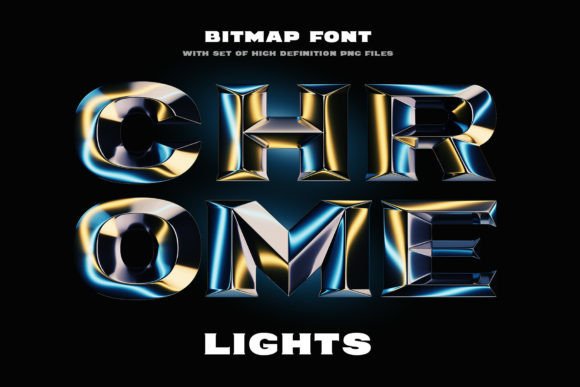
Introducing Chrome Lights Font: Elevate Your Designs with a Shining Touch
In the realm of typography, fonts play a pivotal role in conveying messages, evoking emotions, and adding aesthetic appeal to designs. Among the myriad of font styles available, 3D-rendered typefaces have gained significant popularity for their ability to add depth and realism to creative projects. One such remarkable font that has caught the attention of designers and enthusiasts alike is the Chrome Lights Font. This article aims to provide an in-depth look at the Chrome Lights Font, exploring its features, applications, and the impact it can have on your designs.
What is Chrome Lights Font?
Chrome Lights is a 3D-rendered typeface characterized by its bold, beveled shape and a shining, reflecting surface. This font is designed to give your creative projects a vibrant and dynamic look, making them stand out with a professional and sleek appearance. The Chrome Lights Font is perfect for designers looking to add a touch of luxury, modernity, and sophistication to their work.
📸 Preview Images

💡 Click on any image to view full size
Key Features of Chrome Lights Font
- 3D-Rendered Design: The Chrome Lights Font boasts a stunning 3D-rendered design that adds depth and realism to any project.
- Bold Beveled Shape: Its bold and beveled shape gives the font a strong and sturdy appearance, making it suitable for headlines, titles, and any text that needs to make an impact.
- Shining Reflecting Surface: The shining surface of the font characters adds a reflective quality, giving the text a metallic sheen that mimics chrome.
- Versatility: Despite its specific design, the Chrome Lights Font can be used in a variety of contexts, from digital media to print, and from advertising to personal projects.
Applications of Chrome Lights Font
The Chrome Lights Font’s unique design makes it suitable for a wide range of applications. Here are some of the most notable uses:
- Advertising and Marketing: Use the Chrome Lights Font to create eye-catching headlines and titles for advertisements, brochures, and marketing materials.
- Graphic Design Projects: Enhance your graphic design projects, such as posters, flyers, and banners, with the font’s bold and shiny appearance.
- Web Design: Add a professional and modern touch to your website by using the Chrome Lights Font for headings and titles.
- Video and Animation: The 3D-rendered effect of the font makes it an excellent choice for video titles, intros, and animations.
- Personal Projects: Whether you’re creating a personal portfolio or designing gifts, the Chrome Lights Font can add a unique and stylish touch to your work.
How to Use Chrome Lights Font Effectively
To make the most out of the Chrome Lights Font, consider the following tips:
- Pair with Complementary Fonts: Combine the Chrome Lights Font with simpler fonts to create contrast and enhance readability.
- Adjust Size and Color: Experiment with different sizes and colors to ensure the font complements your design without overpowering it.
- Utilize in Key Areas: Use the Chrome Lights Font in key areas of your design, such as titles or call-to-action buttons, to draw attention.
- Play with Effects: Don’t be afraid to experiment with different effects, such as shadows or highlights, to further enhance the 3D appearance of the font.
Chrome Lights Font: Access Download Now
| Font Name | Chrome Lights Font |
| Author | Gleb Guralnyk |
| Download | Access Download Here |
Conclusion
The Chrome Lights Font is a powerful tool for designers looking to add a touch of elegance, modernity, and professionalism to their projects. Its unique 3D-rendered design, bold beveled shape, and shining reflecting surface make it an excellent choice for a wide range of applications. By understanding its features and applications, and by using it effectively, designers can elevate their work and make it shine.
Frequently Asked Questions
- Q: Is the Chrome Lights Font free to use?
- A: The usage rights of the Chrome Lights Font depend on the license provided by the creator. It’s essential to check the licensing terms before using it for commercial or personal projects.
- Q: Can I use the Chrome Lights Font for commercial projects?
- A: Yes, but ensure you have the appropriate license. Some fonts require a commercial license for use in projects that generate revenue.
- Q: How do I install the Chrome Lights Font on my computer?
- A: Once you’ve downloaded the font, you can install it by following the font installation instructions provided with your operating system.
