
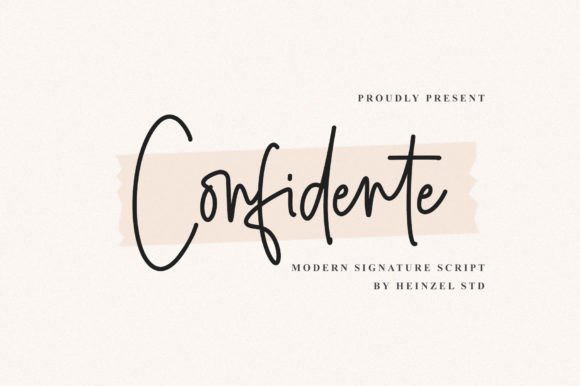
Introducing Confidente Signature Font: Elevate Your Designs with Charming Playfulness
In the world of typography, a font can make or break the visual appeal of a design. When it comes to creating stunning and unique visuals, the right font can elevate your ideas and make them stand out from the crowd. This is where Confidente Signature Font comes in – a lovely script font that features charming, playful characters that seem to dance along the baseline. In this article, we’ll dive into the world of Confidente Signature Font, exploring its features, benefits, and uses, as well as provide tips on how to make the most of this beautiful font.
What is Confidente Signature Font?
Confidente Signature Font is a script font designed to add a touch of playfulness and charm to your designs. With its unique and elegant characters, this font is perfect for creating eye-catching visuals that capture the attention of your audience. The font features a range of characters that seem to dance along the baseline, giving it a lively and dynamic feel.
📸 Preview Images


💡 Click on any image to view full size

Benefits of Using Confidente Signature Font
So, why choose Confidente Signature Font for your designs? Here are just a few benefits of using this lovely script font:
- Unique and Playful Characters: Confidente Signature Font features charming, playful characters that add a touch of whimsy to your designs.
- Elegant and Sophisticated: Despite its playful nature, Confidente Signature Font is also elegant and sophisticated, making it perfect for a range of design applications.
- PUA Encoded: Confidente Signature Font is PUA encoded, which means you can access all of the glyphs and swashes with ease.
- Easy to Use: This font is easy to use and can be installed on your computer or used online.
Uses of Confidente Signature Font
Confidente Signature Font is a versatile font that can be used in a range of design applications, including:
- Logo Design: Use Confidente Signature Font to create a unique and eye-catching logo for your business or brand.
- Wedding Invitations: This font is perfect for creating beautiful and elegant wedding invitations.
- Social Media Graphics: Use Confidente Signature Font to create stunning social media graphics that capture the attention of your audience.
- Advertising: This font is great for creating eye-catching ads that stand out from the crowd.
Tips and Tricks for Using Confidente Signature Font
Here are a few tips and tricks for using Confidente Signature Font:
- Experiment with Different Sizes: Try using Confidente Signature Font in different sizes to create visual interest and hierarchy.
- Mix and Match with Other Fonts: Combine Confidente Signature Font with other fonts to create a unique and eye-catching typography.
- Use the Swashes and Glyphs: Take advantage of the PUA encoding and use the swashes and glyphs to add more personality to your text.
- Keep it Simple: Don’t overcomplicate your design – keep it simple and let the font do the talking.
Font Specifications
| Font Name | Confidente Signature Font |
|---|---|
| Font Type | Script Font |
| PUA Encoding | Yes |
| Characters | Charming, playful characters |
Confidente Signature Font: Access Download Now
| Font Name | Confidente Signature Font |
| Author | Unknown |
| Download | Access Download Here |
Conclusion
In conclusion, Confidente Signature Font is a lovely script font that can add a touch of playfulness and charm to your designs. With its unique and elegant characters, PUA encoding, and ease of use, this font is perfect for a range of design applications. Whether you’re a designer, artist, or simply someone who loves typography, Confidente Signature Font is a great addition to your font collection.
