
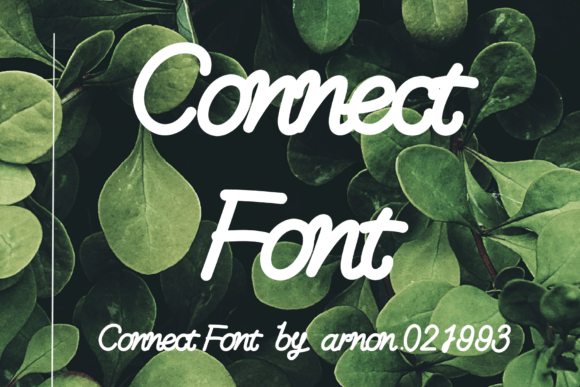
Introducing Connect Font: Unlocking Global Typography with Extensive Language Support
In the realm of digital design, typography plays a pivotal role in conveying messages, evoking emotions, and enhancing user experience. The right font can elevate a design project from ordinary to extraordinary. For designers and businesses aiming to reach a global audience, a font that supports multiple languages is indispensable. This is where Connect Font comes into play, offering an impressive array of features that cater to diverse typographic needs.
What is Connect Font?
Connect Font is a versatile and comprehensive typeface designed to meet the demands of modern digital design. It is not just a font; it’s a tool that bridges linguistic and cultural gaps, allowing designers to create content that resonates with a global audience. Whether you’re working on a website, mobile app, or marketing materials, Connect Font provides the flexibility and inclusivity needed to communicate effectively across different languages and regions.
📸 Preview Images

💡 Click on any image to view full size
Extensive Language Support
One of the standout features of Connect Font is its extensive language support. This font includes hundreds of international language support characters, covering a wide range of languages such as:
- English
- French
- Spanish
- German
- Polish
- Italian
- Portuguese
- Latin
- and many more
This extensive support ensures that designers can create content that is accessible and engaging for a global audience, without the limitations of language barriers.
File Formats: OTF and TTF
Connect Font is available in two widely used file formats: OpenType Font (OTF) and TrueType Font (TTF). This compatibility ensures that the font can be easily integrated into various design software and operating systems, providing flexibility and convenience for designers.
- OTF (OpenType Font): OTF files are highly versatile and support advanced typographic features. They are compatible with both Mac and Windows operating systems, making them ideal for professional design work.
- TTF (TrueType Font): TTF files are widely used and supported across different platforms, including web applications. They offer excellent rendering quality and are suitable for both screen and print design.
Benefits of Using Connect Font
The benefits of using Connect Font in your design projects are numerous. Here are some key advantages:
- Global Reach: With its extensive language support, Connect Font enables you to create content that reaches and engages a global audience.
- Flexibility: Available in OTF and TTF formats, this font can be used across various design applications and platforms.
- Time-Saving: Having a single font that supports multiple languages saves time and effort in font management and substitution.
- Consistency: Using a single font throughout your design project ensures typographic consistency, enhancing the overall visual appeal and professionalism.
Use Cases for Connect Font
Connect Font is suitable for a wide range of design projects, including:
- Web Design: Enhance your website’s typography with a font that supports multiple languages, improving user experience for international visitors.
- Mobile Apps: Use Connect Font in your mobile app design to ensure that your content is readable and engaging for users worldwide.
- Marketing Materials: Create brochures, flyers, and other marketing materials that cater to a global audience, without compromising on typography.
- Multilingual Content: Perfect for content that requires support for multiple languages, such as blogs, eBooks, and whitepapers.
How to Install and Use Connect Font
Installing and using Connect Font is straightforward. Here’s a step-by-step guide:
- Download the Font Files: Obtain the OTF and TTF files of Connect Font from a trusted source.
- Install on Your Computer:
- For Windows: Right-click on the downloaded file, select ‘Install’, and follow the prompts.
- For Mac: Double-click the file, then click ‘Install Font’.
- Use in Design Software: Open your design software (e.g., Adobe Photoshop, Illustrator, Canva), select the text tool, and choose Connect Font from your font library.
Connect Font: Access Download Now
| Font Name | Connect Font |
| Author | arnon.021993 |
| Download | Access Download Here |
Conclusion
Connect Font is a powerful tool for designers and businesses looking to create globally accessible and engaging content. With its extensive language support, compatibility with OTF and TTF formats, and ease of use, it is an ideal choice for a wide range of design projects. By incorporating Connect Font into your typography arsenal, you can ensure that your message resonates with a global audience, fostering greater connection and understanding.
Download Connect Font today and unlock the full potential of your design projects with a single, versatile typeface.
