
Corner Heart Font: Add a Sweet and Playful Touch to Your Documents
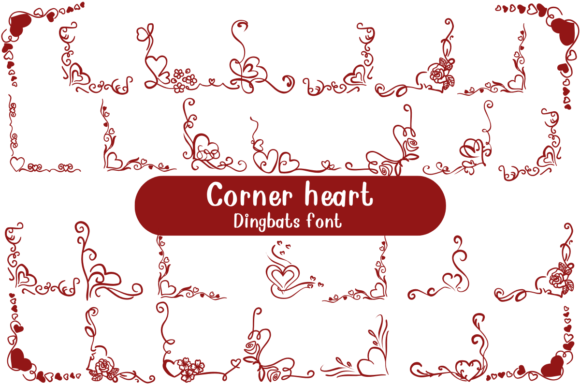
Are you looking for a unique and charming way to decorate your documents, scrapbooks, and crafts? Look no further than the Corner Heart Font, a fun and cute dingbat font that features designs of page corners with hearts. This delightful font is perfect for adding a sweet and playful touch to your pages, making them look charming and unique.
What is Corner Heart Font?
Corner Heart Font is a dingbat font that consists of designs of page corners with hearts. Each character in the font shows a different heart-themed corner design, ranging from simple and elegant to colorful and playful. The font is designed to be used in a variety of creative projects, including scrapbooking, crafting, and document design.
Features of Corner Heart Font
The Corner Heart Font has several features that make it a great choice for your creative projects. Some of its key features include:
- Unique and Charming Designs: Each character in the font features a different heart-themed corner design, making your pages look charming and unique.
- Playful and Sweet: The font is perfect for adding a sweet and playful touch to your documents, scrapbooks, and crafts.
- Easily Customizable: The font can be easily customized to fit your needs, including changing the color, size, and style.
- Compatible with Most Software: The font is compatible with most software, including Microsoft Word, Adobe Illustrator, and Canva.
Uses of Corner Heart Font
The Corner Heart Font can be used in a variety of creative projects, including:
- Scrapbooking: Add a sweet and playful touch to your scrapbook pages with the Corner Heart Font.
- Crafting: Use the font to decorate your crafts, such as cards, gift tags, and journal pages.
- Document Design: Add a charming and unique touch to your documents, such as brochures, flyers, and posters.
- Social Media Graphics: Use the font to create social media graphics, such as Instagram posts and Facebook graphics.
How to Use Corner Heart Font
Using the Corner Heart Font is easy and straightforward. Here are the steps to follow:
- Download and Install the Font: Download the font from a reputable source and install it on your computer.
- Open Your Design Software: Open your design software, such as Microsoft Word or Adobe Illustrator.
- Select the Font: Select the Corner Heart Font from the font menu.
- Type Your Text: Type your text, and the font will automatically apply the heart-themed corner designs.
Tips and Variations
Here are some tips and variations to help you get the most out of the Corner Heart Font:
- Experiment with Different Colors: Experiment with different colors to match your project’s theme and style.
- Combine with Other Fonts: Combine the Corner Heart Font with other fonts to create a unique and interesting look.
- Use in Combination with Images: Use the font in combination with images to create a visually appealing design.
Corner Heart Font: Access Download Now
| Font Name | Corner Heart Font |
| Author | Unknown |
| Download | Access Download Here |
Conclusion
The Corner Heart Font is a fun and cute dingbat font that is perfect for adding a sweet and playful touch to your documents, scrapbooks, and crafts. With its unique and charming designs, easily customizable features, and compatibility with most software, this font is a great choice for any creative project. Whether you’re a scrapbooker, crafter, or document designer, the Corner Heart Font is sure to delight.
FAQs
Here are some frequently asked questions about the Corner Heart Font:
- Q: What is the Corner Heart Font?
- A: The Corner Heart Font is a dingbat font featuring designs of page corners with hearts.
- Q: What software is compatible with the Corner Heart Font?
- A: The font is compatible with most software, including Microsoft Word, Adobe Illustrator, and Canva.
- Q: Can I customize the Corner Heart Font?
- A: Yes, the font can be easily customized to fit your needs, including changing the color, size, and style.
