
Crayon Pastel Font: A Vibrant and Colorful Addition to Your Design Arsenal
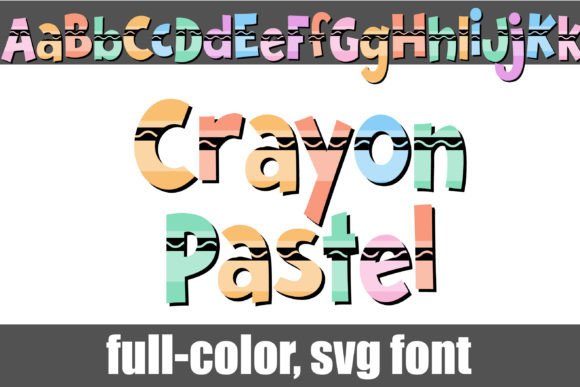
The Crayon Pastel Font is a unique and creative addition to the world of typography. This full-color font features a design inspired by crayons, bringing a touch of childhood nostalgia and playfulness to your designs. With its extensive range of colors and compatibility with various software, this font is perfect for designers, artists, and crafty enthusiasts looking to add a pop of color to their work.
What is Crayon Pastel Font?
The Crayon Pastel Font is an OpenType full-color (SVG) font that features a design inspired by crayons. The font comes with a range of colors, each carefully crafted to replicate the soft, pastel hues of crayons. The font is available in a standard version, and an alternative version can be accessed through your system’s character map, which contains additional colors for all the letters.
📸 Preview Images

💡 Click on any image to view full size
Key Features of Crayon Pastel Font
- Full-color font featuring a design inspired by crayons
- Available in standard and alt versions
- OpenType full-color (SVG) font
- Compatible with various software, including Adobe products, Silhouette Studio, Quark, and Inkscape
- Color fonts will show as black in non-compatible programs
How to Install Crayon Pastel Font
Installing the Crayon Pastel Font is a straightforward process that can be completed in a few steps. The font can be installed like any normal .otf font, and the process varies depending on your operating system.
Installing on Mac
Mac users can install the font using FontBook. Simply follow these steps:
- Download the font file
- Open FontBook on your Mac
- Click on the “+” icon at the bottom of the window
- Select the font file and click “Open”
- The font will be installed and available for use
Installing on Windows
Windows users can install the font using the Control Panel or a font manager. Here’s how:
- Download the font file
- Open the Control Panel and navigate to “Fonts”
- Click on “File” and select “Install new font”
- Select the font file and click “OK”
- The font will be installed and available for use
Using Crayon Pastel Font
Once installed, the Crayon Pastel Font can be used in a variety of software, including Adobe products, Silhouette Studio, Quark, and Inkscape. To use the font, simply select it from the font menu in your software of choice.
Tips for Using Crayon Pastel Font
- Experiment with different colors and combinations to create unique designs
- Use the font to add a touch of whimsy and playfulness to your designs
- Pair the font with other fonts for a contrasting look
- Use the font for headlines, titles, and other display text
Compatibility and Limitations
While the Crayon Pastel Font is compatible with various software, it’s essential to note that color fonts will show as black in non-compatible programs. This is because not all software supports full-color SVG fonts.
Software that Supports Crayon Pastel Font
- Adobe products (Photoshop, Illustrator, etc.)
- Silhouette Studio
- Quark
- Inkscape
Crayon Pastel Font: Access Download Now
| Font Name | Crayon Pastel Font |
| Author | Illustration Ink |
| Download | Access Download Here |
Conclusion
The Crayon Pastel Font is a unique and creative addition to the world of typography. With its extensive range of colors and compatibility with various software, this font is perfect for designers, artists, and crafty enthusiasts looking to add a pop of color to their work. By following the installation and usage guidelines outlined in this article, you can unlock the full potential of the Crayon Pastel Font and take your designs to the next level.
