
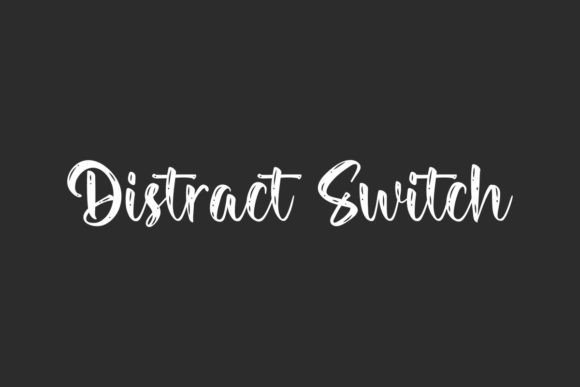
Unleash Your Creativity with Distract Switch Font: A Textured Brush Script Font
In the world of typography, fonts play a crucial role in making or breaking a design. A well-chosen font can elevate your project and make it stand out from the crowd. If you’re looking for a font that can add a unique touch to your designs, look no further than Distract Switch Font. Designed by VinType, Distract Switch is a textured brush script font that boasts a rough, yet charming look. In this article, we’ll explore the features and benefits of Distract Switch Font and how it can be used to take your designs to the next level.
What Makes Distract Switch Font Special?
Distract Switch Font is a one-of-a-kind font that offers a range of features that make it perfect for various design projects. Here are some of its key features:
📸 Preview Images


💡 Click on any image to view full size
- Unique Rough Look: Distract Switch Font has a distinctive rough texture that gives it a handmade look. This texture adds a layer of depth and character to your designs, making them more visually appealing.
- Textured Brush Script: The font features a textured brush script style that is both elegant and rustic. This style makes it perfect for designs that require a touch of sophistication and whimsy.
- Carefully Designed: VinType has carefully crafted Distract Switch Font to ensure that it is easy to read and versatile. The font is designed to make your designs more interesting and engaging.
10 Creative Ways to Use Distract Switch Font
Distract Switch Font is a versatile font that can be used for a wide range of design projects. Here are 10 creative ways to use this font:
- Box Jewelry: Add a touch of elegance to your jewelry packaging with Distract Switch Font. The font’s textured brush script style is perfect for creating luxurious and eye-catching designs.
- Magazine Catalog: Use Distract Switch Font to create a unique and engaging magazine catalog. The font’s rough texture and elegant script style make it perfect for showcasing products and services.
- Packaging Design: Distract Switch Font is ideal for packaging design. The font’s textured brush script style adds a touch of whimsy and sophistication to any product packaging.
- Quote Art: Create stunning quote art with Distract Switch Font. The font’s elegant script style and rough texture make it perfect for highlighting inspirational quotes and phrases.
- Screen Printing: Use Distract Switch Font for screen printing designs. The font’s textured brush script style is perfect for creating unique and eye-catching designs for t-shirts, tote bags, and other apparel.
- Signage: Distract Switch Font is perfect for signage design. The font’s bold and elegant script style makes it easy to read and understand, even from a distance.
- Stationery: Add a touch of elegance to your stationery with Distract Switch Font. The font’s textured brush script style is perfect for creating unique and eye-catching designs for business cards, letterheads, and more.
- Advertising: Use Distract Switch Font to create eye-catching advertising designs. The font’s bold and elegant script style makes it perfect for grabbing attention and conveying messages.
- Branding: Distract Switch Font is ideal for branding projects. The font’s unique rough texture and elegant script style make it perfect for creating a distinctive brand identity.
- Social Media Graphics: Create stunning social media graphics with Distract Switch Font. The font’s textured brush script style is perfect for creating engaging and eye-catching designs for social media platforms.
Tips and Tricks for Using Distract Switch Font
Here are some tips and tricks for getting the most out of Distract Switch Font:
- Experiment with Colors: Distract Switch Font looks great in a range of colors. Experiment with different colors to find the perfect combination for your design.
- Play with Texture: The font’s textured brush script style is one of its standout features. Play with texture to add depth and interest to your designs.
- Use it with Images: Distract Switch Font looks great when paired with images. Use it to add a touch of elegance and sophistication to your designs.
- Don’t Overdo it: While Distract Switch Font is a beautiful font, it’s easy to overdo it. Use it sparingly to avoid overwhelming your design.
In conclusion, Distract Switch Font is a unique and versatile font that can add a touch of elegance and sophistication to any design project. With its textured brush script style and rough texture, it’s perfect for a wide range of designs, from packaging and signage to social media graphics and branding. By following the tips and tricks outlined in this article, you can get the most out of Distract Switch Font and create stunning designs that will leave a lasting impression.
Distract Switch Font: Access Download Now
| Font Name | Distract Switch Font |
| Author | Unknown |
| Download | Access Download Here |
