
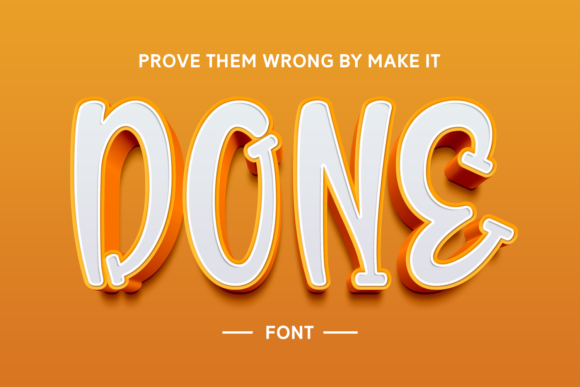
Introducing Done Font: The Bold and Bubbly Display Font for Crafty Designs
Are you looking for a font that can add a playful touch to your craft or design project? Look no further than Done Font! This bold and bubbly display font is perfect for making a statement and taking your designs to the next level. In this article, we’ll take a closer look at Done Font, its features, and how it can be used to enhance your creative projects.
What is Done Font?
Done Font is a display font designed specifically for crafty designs. Its bold and bubbly style makes it perfect for adding a playful element to your projects. Whether you’re working on a DIY craft, a graphic design project, or a digital artwork, Done Font is sure to make a statement.
📸 Preview Images


💡 Click on any image to view full size
Key Features of Done Font
- Bold and Bubbly Style: Done Font features a bold and bubbly style that’s perfect for making a statement.
- Compatible with Cutting Machines: Done Font is compatible with cutting machines such as Cricut and Silhouette, making it perfect for crafty designs.
- Easily Readable: Despite its bold style, Done Font is easily readable, making it perfect for titles, headings, and other design elements.
- Versatile: Done Font can be used for a wide range of design projects, from DIY crafts to digital artworks.
Benefits of Using Done Font
So, why should you use Done Font for your next design project? Here are just a few benefits of using this bold and bubbly display font:
- Adds a Playful Touch: Done Font adds a playful touch to your designs, making them more visually appealing and engaging.
- Enhances Creativity: With its bold and bubbly style, Done Font can help enhance your creativity and inspire new ideas.
- Perfect for Crafty Designs: Done Font is specifically designed for crafty designs, making it perfect for DIY crafts, scrapbooking, and other paper crafts.
- Easy to Use: Done Font is easy to use and can be installed on your computer or cutting machine in just a few minutes.
How to Use Done Font
Using Done Font is easy! Here are the steps to get started:
- Download and Install: Download Done Font from a reputable font website and install it on your computer or cutting machine.
- Choose Your Design Project: Choose the design project you want to work on, whether it’s a DIY craft, a graphic design project, or a digital artwork.
- Type Out Your Text: Type out your text using Done Font, adjusting the size and style as needed.
- Add to Your Design: Add the text to your design, experimenting with different layouts and colors.
Tips and Tricks for Using Done Font
Here are a few tips and tricks for using Done Font:
- Experiment with Colors: Done Font looks great in a variety of colors, so don’t be afraid to experiment and find the perfect hue for your design.
- Play with Size: Done Font can be used at a variety of sizes, from small titles to large headings.
- Combine with Other Fonts: Done Font can be combined with other fonts to create a unique and visually appealing design.
- Use on Cutting Machines: Don’t forget to use Done Font on your cutting machine, such as Cricut or Silhouette, to create custom vinyl decals and other crafty projects.
Done Font: Access Download Now
| Font Name | Done Font |
| Author | Unknown |
| Download | Access Download Here |
Conclusion
In conclusion, Done Font is a bold and bubbly display font that’s perfect for adding a playful element to your next craft or design project. With its compatibility with cutting machines, easily readable style, and versatile design, Done Font is a must-have for any crafty designer. Whether you’re working on a DIY craft, a graphic design project, or a digital artwork, Done Font is sure to make a statement.
Get ready to take your designs to the next level with Done Font! Download Done Font today and start creating your own bold and bubbly designs.
