
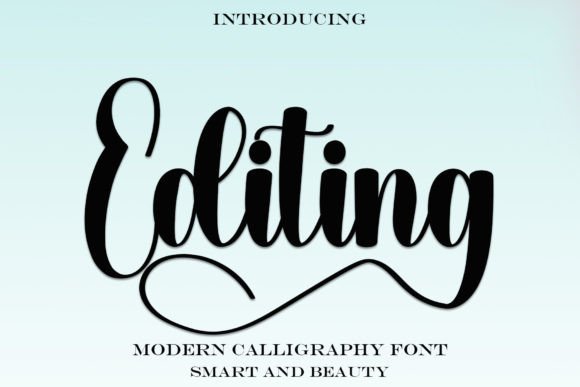
Introducing Editing Font: Elevate Your Designs with Timeless Elegance
In the world of typography, a well-crafted font can make all the difference in elevating your designs to new heights. If you’re on the hunt for a stylish and contemporary handwritten font that exudes impeccable form, look no further than Editing Font. Inspired by timeless classic calligraphy, this beautifully balanced and varied font is designed to enhance the beauty of your projects.
The Story Behind Editing Font
Editing Font is a masterpiece born out of a passion for typography and a deep appreciation for the classics. Its design draws inspiration from traditional calligraphy, infusing it with a modern twist to create a truly unique and versatile typeface. Whether you’re working on a branding project, a website, or marketing materials, Editing Font promises to bring a touch of sophistication and elegance to your work.
📸 Preview Images


💡 Click on any image to view full size
Key Features of Editing Font
- PUA Encoded for Easy Access: One of the standout features of Editing Font is its PUA (Private Use Area) encoding. This means that you can easily access all the amazing glyphs and ligatures, making it simple to add a personal touch to your designs.
- Balanced and Varied: The font boasts a perfect balance of classic charm and modern flair, with a range of variations to keep your designs fresh and engaging.
- Contemporary Atmosphere: Despite its roots in traditional calligraphy, Editing Font has a distinctly contemporary feel, making it perfect for projects that demand a modern aesthetic.
- Impeccable Form: Every letterform has been meticulously crafted to ensure that the font is not only beautiful but also highly legible.
What Makes Editing Font Stand Out?
In a sea of digital fonts, Editing Font stands out for several reasons:
- Unique Character: The font’s distinctive character sets it apart from more generic typefaces, allowing your designs to stand out.
- Versatility: Whether you’re designing for print or digital platforms, Editing Font adapts seamlessly to different mediums and applications.
- Ease of Use: Thanks to its PUA encoding, you can easily incorporate the font’s extensive range of glyphs and ligatures into your projects, giving you unparalleled creative freedom.
Applications of Editing Font
The versatility of Editing Font makes it suitable for a wide range of applications, including:
- Branding and Logo Design: Create memorable and elegant logos that leave a lasting impression.
- Web Design: Enhance the user experience with a font that combines style and readability.
- Marketing and Advertising: Elevate your promotional materials with a sophisticated and contemporary look.
- Packaging Design: Add a touch of luxury and refinement to your product packaging.
Tips for Using Editing Font Effectively
To get the most out of Editing Font, consider the following tips:
- Experiment with Ligatures: Take advantage of the font’s ligatures to add a unique flair to your text.
- Play with Weights: If available, experiment with different font weights to create visual hierarchy and emphasis.
- Pair it Wisely: Combine Editing Font with complementary typefaces to create visually appealing and harmonious designs.
Editing Font: Access Download Now
| Font Name | Editing Font |
| Author | Unknown |
| Download | Access Download Here |
Conclusion
Editing Font is more than just a typeface; it’s a design tool that can transform your projects with its timeless elegance and contemporary charm. With its PUA encoding, balanced design, and impeccable form, this font is poised to become a staple in your typography arsenal. Whether you’re a seasoned designer or just starting out, Editing Font offers the perfect blend of style, versatility, and ease of use to elevate your designs to new heights.
Getting Started with Editing Font
Ready to experience the beauty of Editing Font for yourself? Here’s how to get started:
- Download the Font: Access the font file and install it on your computer.
- Explore the Glyphs: Use software like Adobe Illustrator or FontLab to explore the font’s glyphs and ligatures.
- Start Designing: Incorporate Editing Font into your projects and discover the difference it can make.
Editing Font – A Designer’s Perspective
As a designer, the choice of font can make or break a project. With Editing Font, I’ve found a typeface that not only meets but exceeds my expectations. Its unique blend of classic inspiration and modern design makes it a go-to for any project that demands elegance and sophistication.
The Future of Typography with Editing Font
The future of typography is bright, and fonts like Editing Font are leading the way. By combining traditional techniques with modern technology, Editing Font sets a new standard for what a typeface can achieve.
