
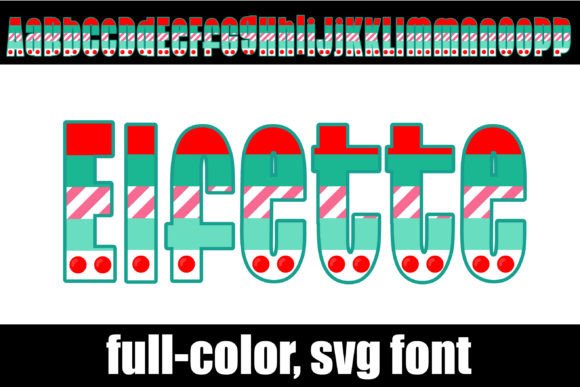
Elfette Font: A Modern Christmas Font with a Touch of Personality
Are you looking for a unique and modern font to add a touch of personality to your designs this Christmas season? Look no further than the Elfette Font, a full-color font that features a modern design in multiple prints and a Christmas color palette. In this article, we’ll take a closer look at the Elfette Font, its features, and how to install and use it in your designs.
What is Elfette Font?
Elfette Font is a modern Christmas font that features a full-color design with multiple prints and a festive color palette. It’s perfect for adding a touch of personality to your designs, from simple text logos to complex illustrations. The font is available in OpenType full-color (SVG) format, which means it can be installed like any normal .otf font.
📸 Preview Images

💡 Click on any image to view full size
Key Features of Elfette Font
- Modern font design in multiple prints
- Christmas color palette
- OpenType full-color (SVG) font
- Installs like any normal .otf font
- Supports full-color SVG fonts
- Vector-based, scalable to any size without losing quality
How to Install Elfette Font
Installing Elfette Font is easy and straightforward. The process varies depending on your operating system and device. Here’s a step-by-step guide on how to install the font:
For Mac Users:
- Download the Elfette Font file from a trusted source.
- Open FontBook, which is a built-in font manager on Macs.
- Click on the “+” button at the bottom of the FontBook window.
- Select the Elfette Font file and click “Open”.
- The font will be installed and available for use in your designs.
For Windows Users:
- Download the Elfette Font file from a trusted source.
- Open the Control Panel and navigate to the “Fonts” section.
- Click on “File” and then “Install new font”.
- Select the Elfette Font file and click “OK”.
- The font will be installed and available for use in your designs.
Which Programs Support Elfette Font?
Elfette Font is a full-color SVG font, which means it requires a program that supports color fonts to display in color. Some popular programs that support full-color SVG fonts include:
- Adobe products (e.g. Photoshop, Illustrator, InDesign)
- Silhouette Studio
- Quark
- Inkscape
If you’re using a program that doesn’t support color fonts, the Elfette Font will display as black. You can check if your program supports color fonts by typing on a document and checking if the font appears in color.
How to Use Elfette Font in Your Designs
Using Elfette Font in your designs is easy and fun. Here are some tips to get you started:
Tips and Tricks:
- Experiment with different colors and styles to add a touch of personality to your designs.
- Use Elfette Font to create simple text logos, headings, and titles.
- Combine Elfette Font with other fonts and graphics to create complex illustrations.
- Take advantage of the font’s vector-based design, which allows it to be scaled to any size without losing quality.
The Benefits of Using SVG Fonts
SVG fonts, like Elfette Font, offer a range of benefits for designers. Here are some of the advantages of using SVG fonts:
Scalability:
SVG fonts are vector-based, which means they can be scaled to any size without losing quality. This makes them perfect for use in a variety of designs, from business cards to billboards.
Color Support:
SVG fonts support full-color designs, which allows for a wide range of creative possibilities. You can use Elfette Font to add a pop of color to your designs and make them stand out.
Flexibility:
SVG fonts can be used in a variety of programs and devices, making them a versatile choice for designers.
In conclusion, Elfette Font is a modern Christmas font that offers a unique and fun way to add a touch of personality to your designs. With its full-color design, multiple prints, and Christmas color palette, it’s perfect for creating festive and eye-catching designs. By following the installation guide and using a program that supports color fonts, you can take advantage of the font’s features and create stunning designs.
Elfette Font: Access Download Now
| Font Name | Elfette Font |
| Author | Illustration Ink |
| Download | Access Download Here |
