
Amytha Font: The Epitome of Modern Handwritten Elegance
In the vast and ever-evolving world of typography, the introduction of a new font can either go unnoticed or make a significant impact. However, when a font like Amytha comes along, it’s hard not to take notice. Amytha is not just any font; it’s a modern handwritten font that has been meticulously designed to bring a blend of simplicity and elegance to the table. Its clean lines and unadorned style make it an ideal choice for a variety of design projects that demand a touch of personal sophistication.
What is Amytha Font?
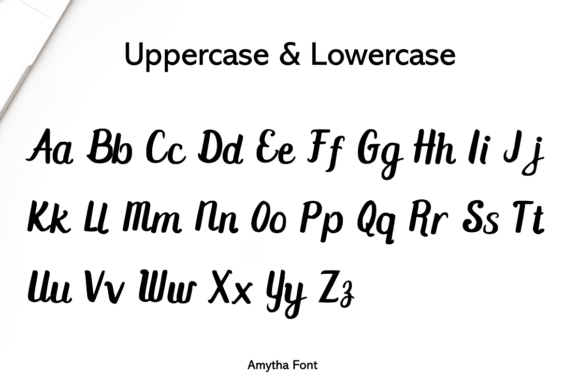
Amytha is a thoughtfully crafted handwritten font that stands out in the digital age for its simplicity and elegance. Unlike traditional fonts that might rely on intricate designs or overly ornate details, Amytha takes a more minimalist approach. Its design focuses on clean lines, simple curves, and an overall uncluttered appearance. This makes Amytha incredibly versatile, capable of being used in a wide range of applications, from digital content creation to print materials.
📸 Preview Images

💡 Click on any image to view full size
The Design Philosophy Behind Amytha
The design philosophy behind Amytha is centered around the idea that sometimes, less is more. In an era where digital content is king, and the attention span of audiences is shorter than ever, fonts that are clear, readable, and straightforward have become invaluable. Amytha’s creators aimed to produce a font that could convey messages with clarity and a touch of warmth, making it suitable for both personal and professional projects.
The simplicity of Amytha does not compromise its elegance. Instead, it manages to exude a refined sense of style that can elevate the aesthetic of any piece of content. Whether it’s used for headings, body text, or captions, Amytha brings a level of sophistication that is hard to achieve with more ornate or traditional fonts.
The Versatile Uses of Amytha Font
One of the key benefits of Amytha is its versatility. Its design is broad enough to be used in various contexts without ever looking out of place. Here are some of the many uses of Amytha font:
- Digital Content Creation: For bloggers, content creators, and digital marketers, Amytha can add a personal touch to written content, making it more engaging and readable.
- Branding and Marketing Materials: Businesses looking for a modern yet approachable font for their branding, advertising materials, or packaging will find Amytha to be an excellent choice.
- Web Design: Web designers can use Amytha for both body text and headings, creating a cohesive and elegant look for websites.
- Print Materials: From brochures and flyers to business cards and invitations, Amytha brings a touch of sophistication to any print material.
- Social Media Graphics: For social media influencers and businesses, Amytha can be used to create eye-catching and professional-looking graphics.
Typographic Features of Amytha
Amytha’s beauty lies in its typographic features, which have been carefully designed to ensure readability and aesthetic appeal. Some of its notable features include:
- Clean Lines: The font features clean and smooth lines that contribute to its modern look.
- Simple Curves: Curves in Amytha are gracefully designed, adding to the font’s elegance.
- Consistent Weight: The font maintains a consistent weight throughout, making it highly readable.
- Versatile Character Set: Amytha includes a wide range of characters, making it suitable for various languages and types of content.
Amytha in Comparison to Other Fonts
When compared to other modern fonts, Amytha stands out for its unique balance of simplicity and elegance. While some fonts may lean too heavily on being minimalist and end up looking bland, Amytha manages to incorporate enough character to be interesting without being overbearing. Its closest competitors might include other modern handwritten fonts, but Amytha’s distinctiveness lies in its ability to convey a sense of warmth and approachability.
How to Use Amytha Font
Using Amytha in your projects is straightforward. Here are some steps to get you started:
- Download and Install: First, download the Amytha font from a reputable source. Install it on your computer or device.
- Select the Font: Once installed, select Amytha as your font in your design software or word processor.
- Experiment with Sizes and Colors: Play around with different sizes and colors to find what works best for your project.
- Pair with Other Fonts: Don’t be afraid to pair Amytha with other fonts for contrast. Its simplicity makes it a great companion for a variety of typefaces.
Amytha Font: Access Download Now
| Font Name | Amytha Font |
| Author | Unknown |
| Download | Access Download Here |
Conclusion
Amytha font represents a significant addition to the world of typography. Its modern handwritten design, characterized by clean lines and a simple yet elegant appearance, makes it a versatile tool for designers and content creators. Whether you’re looking to add a touch of sophistication to your digital content, branding materials, or print projects, Amytha is a font that can meet your needs. Its readability, aesthetic appeal, and the warmth it brings to content make it an excellent choice for anyone looking to elevate their design projects.
The Future Outlook for Amytha Font
As design trends continue to evolve, fonts like Amytha are likely to play a crucial role in shaping the visual landscape of digital and print media. With its timeless elegance and modern appeal, Amytha is poised to remain a popular choice among designers and content creators for years to come. Its ability to convey messages with clarity and warmth ensures that it will continue to be a valuable asset in the world of design.
