
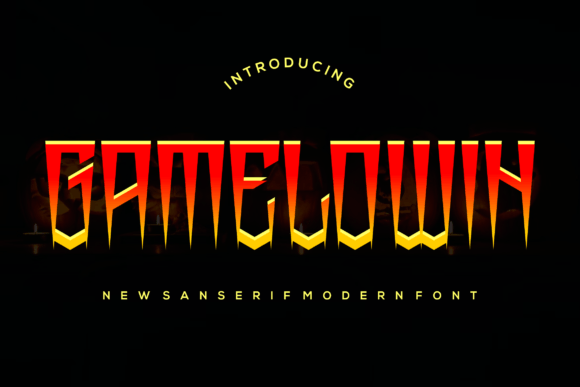
Gamelowin Font: A Magical Display Font for Your Designs
In the world of typography, fonts play a crucial role in bringing designs to life. A unique and captivating font can instantly elevate your project and leave a lasting impression on your audience. If you’re on the hunt for a font that exudes modernity with a touch of whimsy, look no further than the Gamelowin Font. This incredibly cool and unique display font is about to transport your designs into a magical world.
The Uniqueness of Gamelowin Font
Gamelowin Font stands out from the crowd with its modern yet whimsical style. Its distinctive characters are carefully crafted to add a dash of playfulness to any design, making it perfect for projects that require a bit of flair. Whether you’re working on a branding campaign, an advertising project, or simply want to create eye-catching social media graphics, Gamelowin Font is sure to impress.
📸 Preview Images


💡 Click on any image to view full size
Key Features of Gamelowin Font
- Modern yet Whimsical Style: Gamelowin Font boasts a contemporary design with a hint of playfulness, making it versatile for various design projects.
- Unique Character Set: Each character in the Gamelowin Font is uniquely designed to ensure your designs stand out.
- Display Font: Ideal for headlines, titles, and short texts where you want to make a significant impact.
- Magical Aesthetic: Adds a touch of magic to your designs, making them more captivating and engaging.
Applications of Gamelowin Font
The versatility of Gamelowin Font makes it suitable for a wide range of applications. Here are some of the areas where this font truly shines:
- Branding and Logos: Use Gamelowin Font to create memorable logos and brand names that stand out.
- Advertising and Marketing: Elevate your ad campaigns with eye-catching titles and slogans.
- Social Media Graphics: Make your social media posts more engaging with captivating headlines and text.
- Web Design: Enhance the visual appeal of your website with unique and modern typography.
- Print Design: From brochures to posters, add a magical touch to your print materials.
How to Use Gamelowin Font Effectively
To make the most out of Gamelowin Font, consider the following tips:
- Pair with Complementary Fonts: Combine Gamelowin Font with simpler fonts for body text to create a balanced design.
- Play with Colors: Experiment with vibrant colors to enhance the whimsical feel of the font.
- Adjust Size and Weight: Use different sizes and weights of Gamelowin Font to create a hierarchy of information.
- Limit Text: Given its decorative nature, use Gamelowin Font for short texts to maintain readability.
The Impact of Gamelowin Font on Design
Incorporating Gamelowin Font into your designs can have a significant impact. It not only adds a unique aesthetic but also:
- Enhances Creativity: The playful nature of the font encourages creative and out-of-the-box thinking.
- Increases Engagement: The eye-catching design helps in capturing the audience’s attention quickly.
- Strengthens Brand Identity: A distinctive font like Gamelowin can become a part of your brand’s visual identity.
Gamelowin Font: Access Download Now
| Font Name | Gamelowin Font |
| Author | Unknown |
| Download | Access Download Here |
Conclusion
Gamelowin Font is more than just a display font; it’s a tool to transform your designs into magical creations. Its modern yet whimsical style makes it perfect for a variety of projects, from branding and advertising to web and print design. By incorporating Gamelowin Font into your projects, you’re not just choosing a font; you’re choosing to make a statement. So, why settle for ordinary when you can make your designs extraordinary with Gamelowin Font?
FAQs About Gamelowin Font
- Q: Is Gamelowin Font free to use?
A: The usage rights of Gamelowin Font depend on the license provided by the creator. Some fonts are free for personal use, while others may require a purchase for commercial projects.
- Q: Can I use Gamelowin Font for my website?
A: Yes, you can use Gamelowin Font for your website, especially for headings and titles. Ensure you have the appropriate license for web use.
- Q: How do I install Gamelowin Font on my computer?
A: Download the font files, extract them, and then install them through your computer’s font management system or by right-clicking and selecting ‘Install’.
- Q: Can I modify Gamelowin Font?
A: Modifying a font usually requires specific permission from the creator. It’s best to check the licensing agreement provided with the font.
