
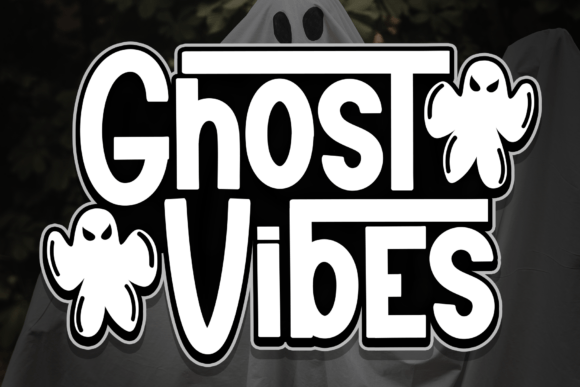
Introducing Ghost Vibes Font: The Spookiest Display Font for Your Halloween Designs
Are you looking for a font that will add a playful and spooky touch to your designs? Look no further than Ghost Vibes Font! This fun and bold display font features cute ghost shapes next to each letter, giving your text a unique and eerie charm that’s perfect for Halloween designs or any project that needs a bit of whimsy.
What is Ghost Vibes Font?
Ghost Vibes Font is a display font designed to add a touch of spookiness to your designs. Each letter is accompanied by a cute ghost shape, giving the text a playful and eerie look. The font is perfect for creating eye-catching headlines, titles, and captions for Halloween-themed designs, such as party invitations, pumpkin carvings, and spooky decorations.
📸 Preview Images


💡 Click on any image to view full size
The font is also great for adding a touch of whimsy to your everyday designs, such as social media graphics, blog posts, and advertisements. Whether you’re a designer, a small business owner, or just someone who loves Halloween, Ghost Vibes Font is a great addition to your font collection.
Key Features of Ghost Vibes Font
- Unique Ghost Design: Each letter is accompanied by a cute ghost shape, giving the text a playful and spooky look.
- Bold and Eye-Catching: The font is designed to be bold and eye-catching, making it perfect for headlines, titles, and captions.
- Playful and Eerie: The ghost shapes add a playful and eerie touch to the text, making it perfect for Halloween designs.
- Easy to Use: The font is easy to use and can be installed on your computer or used online.
Uses of Ghost Vibes Font
Ghost Vibes Font is a versatile font that can be used for a variety of design projects. Here are some ideas:
- Halloween Designs: Use Ghost Vibes Font to create spooky and fun designs for Halloween, such as party invitations, pumpkin carvings, and spooky decorations.
- Social Media Graphics: Add a touch of whimsy to your social media graphics, such as Facebook posts, Twitter headers, and Instagram stories.
- Blog Posts: Use Ghost Vibes Font to add a playful touch to your blog posts, especially those related to Halloween or spooky topics.
- Advertisements: Use Ghost Vibes Font to create eye-catching advertisements for Halloween-themed products or services.
How to Use Ghost Vibes Font
Using Ghost Vibes Font is easy! Here are the steps:
- Download the Font: Download the Ghost Vibes Font file from a reputable font website.
- Install the Font: Install the font on your computer by following the installation instructions.
- Choose the Font: Choose Ghost Vibes Font from your font list in your design software.
- Type Your Text: Type your text and enjoy the spooky and playful look of Ghost Vibes Font!
Tips and Variations
Here are some tips and variations to get the most out of Ghost Vibes Font:
- Experiment with Colors: Try different colors to match your design theme, such as orange and black for Halloween.
- Combine with Other Fonts: Combine Ghost Vibes Font with other fonts to create a unique and interesting look.
- Use for Headlines and Titles: Use Ghost Vibes Font for headlines and titles to add a touch of whimsy and playfulness.
Ghost Vibes Font: Access Download Now
| Font Name | Ghost Vibes Font |
| Author | Unknown |
| Download | Access Download Here |
Conclusion
Ghost Vibes Font is a fun and bold display font that’s perfect for adding a playful and spooky touch to your designs. With its unique ghost design, bold and eye-catching look, and easy-to-use format, Ghost Vibes Font is a great addition to your font collection. Try it out today and add some eerie charm to your designs!
