
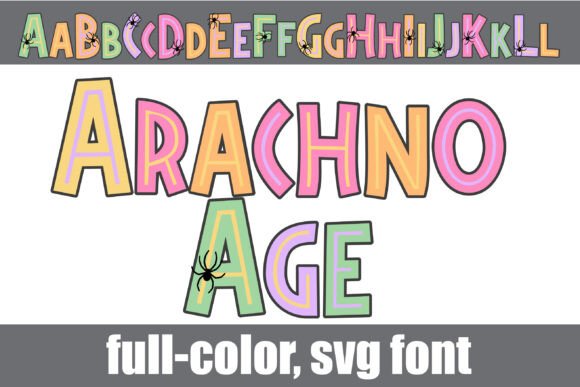
Arachno Age Font: A Prehistoric Halloween Font with a Pop of Color
The Arachno Age Font is a unique and eye-catching font that combines a prehistoric style with a Halloween color palette. This full-color font is perfect for adding a touch of personality to your designs, and its compatibility with various programs makes it easy to use. In this article, we’ll explore the features of the Arachno Age Font, its uses, and how to install and use it.
What is Arachno Age Font?
The Arachno Age Font is a prehistoric font with a Halloween color palette. It’s a full-color font that features a range of colors, making it perfect for titles, displays, posters, and more. The font comes with an alt version that contains additional colors of all the letters, which can be accessed through your system’s character map.
📸 Preview Images

💡 Click on any image to view full size
Key Features of Arachno Age Font
- Prehistoric font style
- Halloween color palette
- Full-color font with a range of colors
- Alt version with additional colors
- Compatible with Silhouette Studio and other programs
How to Use Arachno Age Font
The Arachno Age Font is perfect for a variety of design projects, including:
- Titles and headings
- Posters and flyers
- Logos and branding
- Social media graphics
- Halloween-themed designs
To use the Arachno Age Font, simply install it on your computer like any other font. The installation process varies depending on your operating system.
Installation Process
To install the Arachno Age Font on your computer, follow these steps:
Mac Users:
- Download the font file
- Open FontBook
- Click on the “+” button and select the font file
- The font will be installed automatically
Windows Users:
- Download the font file
- Open the Control Panel
- Click on “Fonts”
- Drag and drop the font file into the Fonts folder
- The font will be installed automatically
Compatibility with Design Programs
The Arachno Age Font is compatible with various design programs, including:
- Adobe products (Photoshop, Illustrator, etc.)
- Silhouette Studio
- Quark
- Inkscape
However, it’s essential to note that color fonts may show as black in non-compatible programs. You will know if your program supports color fonts when you type on the document and see them in color.
Benefits of Using Full-Color SVG Fonts
Full-color SVG fonts, like the Arachno Age Font, offer several benefits, including:
- Scalability: SVG fonts can be scaled to any size without losing quality
- Vector-based: SVG fonts are vector-based, making them perfect for designs that require precision
- Range of colors: Full-color SVG fonts offer a range of colors, making them perfect for adding personality to your designs
Tips for Using Arachno Age Font
Here are some tips for using the Arachno Age Font:
- Use it for titles and headings to add a pop of color
- Experiment with different colors and styles
- Use it for Halloween-themed designs to create a spooky atmosphere
- Combine it with other fonts for a unique look
Arachno Age Font: Access Download Now
| Font Name | Arachno Age Font |
| Author | Illustration Ink |
| Download | Access Download Here |
Conclusion
The Arachno Age Font is a unique and eye-catching font that combines a prehistoric style with a Halloween color palette. Its compatibility with various programs and scalability make it perfect for adding a touch of personality to your designs. With its range of colors and styles, you can create anything from simple text logos to complex illustrations.
Font Details:
- Font Name: Arachno Age Font
- Font Style: Prehistoric
- Color Palette: Halloween
- File Format: OTF
- Compatibility: Silhouette Studio, Adobe products, Quark, Inkscape
