
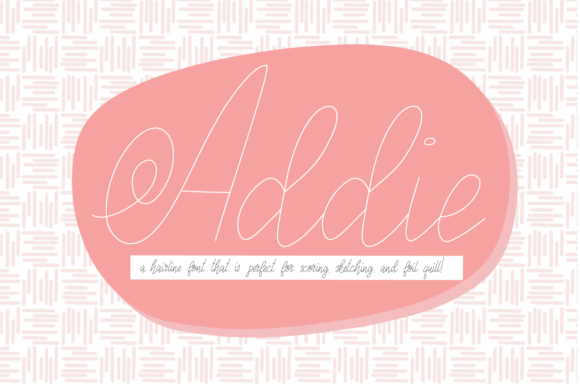
Addie Font: The Perfect Hairline Font for Your Next Crafting Project
If you’re looking for a unique and quirky hairline font for your next crafting project, look no further than Addie Font. This hairline font is specifically designed for use with cutting machines like Glowforge, Silhouette, or Cricut, and is perfect for scoring, sketch pens, or foil quill projects. In this article, we’ll take a closer look at the features of Addie Font and how to use it to achieve professional-looking results.
What is Addie Font?
Addie Font is a hairline font that was created based on the letters of the Ashleigh font. It has a unique and quirky design that is perfectly thin for use with cutting machines. The font was specifically designed for use with Glowforge, Silhouette, or Cricut machines, and is ideal for scoring, sketch pens, or foil quill projects.
📸 Preview Images

💡 Click on any image to view full size
Features of Addie Font
So, what makes Addie Font so special? Here are just a few of its key features:
- Unique and quirky design: Addie Font has a one-of-a-kind hairline design that is sure to add a touch of personality to your crafting projects.
- Perfectly thin: The font is designed to be perfectly thin, making it ideal for use with cutting machines.
- No pesky center void: When used with the right settings, Addie Font produces a solid letter with no pesky center void.
- Compatible with popular cutting machines: Addie Font is compatible with Glowforge, Silhouette, or Cricut machines, making it easy to incorporate into your crafting workflow.
How to Use Addie Font
Using Addie Font is easy! Here are the steps to follow:
- Choose your font: Select Addie Font from your font library and import it into your cutting machine software.
- Adjust your settings: In your software, change the font to no-fill and add a line color.
- Cut your design: Send your design to your cutting machine and let it do its magic.
Tips for Using Addie Font
Here are a few tips to keep in mind when using Addie Font:
- Use the right settings: Make sure to change the font to no-fill and add a line color to achieve the best results.
- Experiment with different line widths: Depending on your project, you may want to experiment with different line widths to achieve the desired effect.
- Don’t be afraid to get creative: Addie Font is a versatile font that can be used in a variety of creative ways. Don’t be afraid to experiment and try new things!
Why Addie Font May Look Off in Font Previewers
It’s worth noting that Addie Font may look off in font previewers due to how it was made. The font was specifically designed for use with cutting machines and for scoring, sketch pens, or foil quill projects, not for print. This means that it may not display as clearly or crisply in font previewers as it will in your final project.
Addie Font: Access Download Now
| Font Name | Addie Font |
| Author | Unknown |
| Download | Access Download Here |
Conclusion
Addie Font is a unique and versatile hairline font that is perfect for use with cutting machines like Glowforge, Silhouette, or Cricut. Its quirky design and perfectly thin lines make it ideal for scoring, sketch pens, or foil quill projects. By following the tips and guidelines outlined in this article, you can achieve professional-looking results with Addie Font. So why not give it a try and see what creative projects you can come up with?
Frequently Asked Questions
- What is Addie Font?
- Addie Font is a hairline font specifically designed for use with cutting machines like Glowforge, Silhouette, or Cricut.
- What is Addie Font used for?
- Addie Font is ideal for scoring, sketch pens, or foil quill projects.
- Why does Addie Font look off in font previewers?
- Addie Font may look off in font previewers due to how it was made, specifically for use with cutting machines and not for print.
