
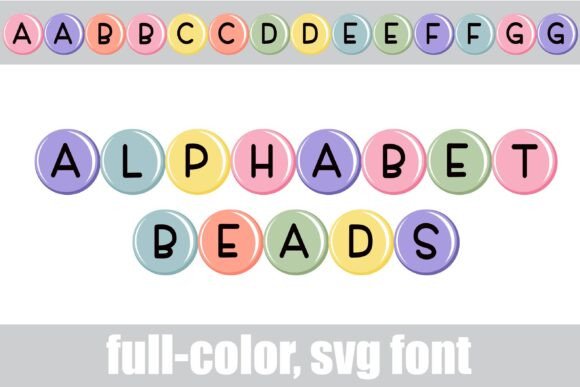
Introducing Alphabet Beads Font: A Colorful and Fun Way to Elevate Your Designs
Are you looking for a unique and creative way to add some personality to your designs? Look no further than the Alphabet Beads Font, a full-color font featuring round, pastel-colored beads with a simple print. This fun and playful font is perfect for a variety of design projects, from simple text logos to complex illustrations.
Key Features of Alphabet Beads Font
- Full-color font featuring round, pastel-colored beads with a simple print
- Alt case of additional colors of each letter accessible through system or Silhouette’s glyph map
- Includes bunny and chick glyphs accessible through greater than and less than glyphs
- OpenType full-color (SVG) font installed like any normal .otf font
- Compatible with Adobe products, Silhouette Studio, Quark, Inkscape, and more
How to Install Alphabet Beads Font
Installing Alphabet Beads Font is easy and straightforward. For Mac users, simply use FontBook to install the font. For Windows users, you can use your preferred font manager or Control Panel to install the font. Once installed, you can access the font in your design program like any other font.
It’s worth noting that color fonts may show as black in non-compatible programs. However, if your program supports color fonts, you will see the colors when you type on the document.
Programs that Support Full-Color SVG Fonts
Not all design programs support full-color SVG fonts, but many popular programs do. Some examples of programs that support full-color SVG fonts include:
- Adobe products (e.g. Illustrator, Photoshop)
- Silhouette Studio
- Quark
- Inkscape
If you’re not sure if your program supports full-color SVG fonts, you can test it out by typing on a document and seeing if the colors appear.
The Benefits of Using Full-Color SVG Fonts
Full-color SVG fonts like Alphabet Beads Font offer a range of benefits for designers. For one, they provide a unique and creative way to add personality to your designs. With a full range of colors and styles to choose from, you can create anything from simple text logos to complex illustrations.
Additionally, SVG fonts are vector-based, which means they can be scaled to any size without losing quality. This makes them perfect for use in a variety of design projects, from business cards to billboards.
Design Ideas Using Alphabet Beads Font
So, what can you create with Alphabet Beads Font? The possibilities are endless! Here are a few ideas to get you started:
- Simple text logos with a pop of color
- Complex illustrations featuring colorful beads
- Custom party invitations or decorations
- Colorful social media graphics
- Unique and creative typography
Glyph Features of Alphabet Beads Font
Alphabet Beads Font includes a range of glyph features that make it easy to customize your designs. For example, you can access an alt case of additional colors of each letter through your system or Silhouette’s glyph map. You can also access a bunny and chick glyph by typing the greater than and less than glyphs.
These glyph features make it easy to add a personal touch to your designs and create unique and creative typography.
Tips and Tricks for Using Alphabet Beads Font
Here are a few tips and tricks for getting the most out of Alphabet Beads Font:
- Experiment with different color combinations to create unique and creative designs
- Use the glyph features to add a personal touch to your designs
- Scale the font to any size without losing quality
- Use the font in combination with other design elements, such as shapes or images
Alphabet Beads Font: Access Download Now
| Font Name | Alphabet Beads Font |
| Author | Illustration Ink |
| Download | Access Download Here |
Conclusion
Alphabet Beads Font is a fun and creative way to add personality to your designs. With its full-color, pastel-colored beads and simple print, this font is perfect for a variety of design projects. Whether you’re creating simple text logos or complex illustrations, Alphabet Beads Font is a great choice.
