
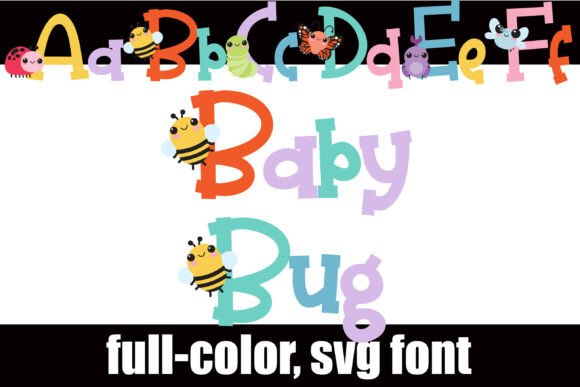
Baby Bug Font: A Whimsical and Cute Addition to Your Typography
The Baby Bug Font is a delightful and charming addition to the world of typography. This full-color font features a whimsical, crafty design of cute bugs on the uppercase of serif lettering, making it perfect for projects that require a touch of playfulness and fun. In this article, we will explore the features and benefits of the Baby Bug Font, as well as provide a comprehensive guide on how to install and use it.
What is the Baby Bug Font?
The Baby Bug Font is a unique and creative font that features cute bugs on the uppercase of serif lettering. The font comes with an alternative case of additional colors for each letter, which can be accessed through your system or Silhouette’s glyph map. This means that you can use the font in a variety of colors, adding more depth and visual interest to your designs.
📸 Preview Images

💡 Click on any image to view full size
Key Features of the Baby Bug Font
- Whimsical and crafty design: The Baby Bug Font features a charming and playful design that is perfect for projects that require a touch of fun and whimsy.
- Full-color font: The font is a full-color font, which means that it can be used in a variety of colors, adding more depth and visual interest to your designs.
- Uppercase and alternative case: The font features uppercase letters with cute bugs, as well as an alternative case of additional colors for each letter.
- OpenType full-color (SVG) font: The Baby Bug Font is an OpenType full-color (SVG) font, which means that it can be installed like any normal .otf font.
How to Install the Baby Bug Font
Installing the Baby Bug Font is a straightforward process that can be completed in a few steps. Here’s a step-by-step guide on how to install the font on your Mac or Windows computer:
Installing on Mac
Mac users can install the Baby Bug Font using FontBook. Here’s how:
- Download the Baby Bug Font file from a reputable source.
- Open FontBook on your Mac. You can find FontBook in the Applications/Utilities folder.
- Click on the “+” button at the bottom of the FontBook window.
- Navigate to the location where you saved the Baby Bug Font file and select it.
- Click “Open” to install the font.
Installing on Windows
Windows users can install the Baby Bug Font using the Control Panel. Here’s how:
- Download the Baby Bug Font file from a reputable source.
- Open the Control Panel on your Windows computer.
- Click on “Appearance and Personalization” and then click on “Fonts”.
- Click on “File” and then click on “Install new font”.
- Navigate to the location where you saved the Baby Bug Font file and select it.
- Click “OK” to install the font.
Using the Baby Bug Font
Once you have installed the Baby Bug Font, you can use it in a variety of programs that support OpenType full-color (SVG) fonts. Some of the programs that support this font include:
- Adobe products (e.g. Adobe Illustrator, Adobe Photoshop)
- Silhouette Studio
- Quark
- Inkscape
When using the Baby Bug Font in a program that supports OpenType full-color (SVG) fonts, you will see the font in color. However, if you are using a program that does not support this font, it will show as black.
Tips and Tricks for Using the Baby Bug Font
Here are some tips and tricks for using the Baby Bug Font:
- Use it for kids’ projects: The Baby Bug Font is perfect for kids’ projects, such as birthday cards, invitations, and posters.
- Use it for branding: The font can also be used for branding, such as for a children’s clothing company or a toy manufacturer.
- Experiment with different colors: The Baby Bug Font comes with an alternative case of additional colors for each letter, so don’t be afraid to experiment with different colors to add more visual interest to your designs.
Baby Bug Font: Access Download Now
| Font Name | Baby Bug Font |
| Author | Illustration Ink |
| Download | Access Download Here |
Conclusion
The Baby Bug Font is a unique and creative font that can add a touch of whimsy and fun to your designs. With its full-color design and alternative case of additional colors, it’s perfect for projects that require a playful and eye-catching font. By following the installation instructions and using it in programs that support OpenType full-color (SVG) fonts, you can take advantage of the many benefits that this font has to offer.
