
Baby Squeaks Font: A Comprehensive Guide to this Adorable Full-Color Font
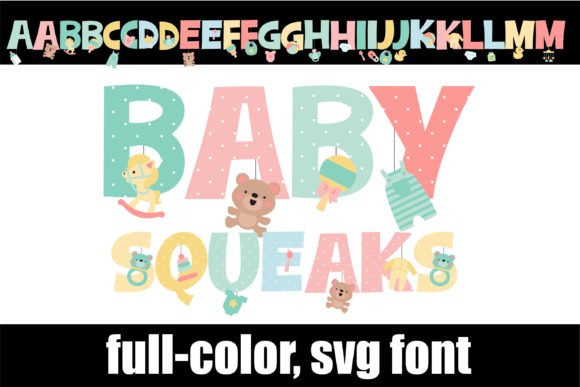
The Baby Squeaks Font is a delightful full-color font that features a pastel color palette and adorable baby toys and supplies. This font is perfect for designing cute and playful content for baby-related products, such as baby shower invitations, nursery decor, and baby clothing. In this article, we will explore the features of the Baby Squeaks Font, how to install and use it, and its compatibility with various software programs.
Features of Baby Squeaks Font
The Baby Squeaks Font is a unique and charming font that offers a range of features that make it perfect for designing baby-related content. Some of its key features include:
📸 Preview Images

💡 Click on any image to view full size
- A pastel color palette that is soft and soothing
- Adorable baby toys and supplies, such as pacifiers, baby blocks, and stuffed animals
- A second upper and lower alt case that can be accessed through your system’s character map
- OpenType full-color (SVG) font that can be installed like any normal .otf font
Installing Baby Squeaks Font
Installing the Baby Squeaks Font is a straightforward process that can be completed in a few steps. Here’s how to install the font on Mac and Windows:
Mac Users:
Mac users can install the Baby Squeaks Font using FontBook. Here’s how:
- Download the Baby Squeaks Font file (.otf) from a trusted font website
- Open FontBook on your Mac. You can find FontBook in the Applications/Utilities folder or use Spotlight to search for it
- Click on the “+” button at the bottom of the FontBook window
- Navigate to the location where you saved the Baby Squeaks Font file and select it
- Click “Open” to install the font
Windows Users:
Windows users can install the Baby Squeaks Font using their preferred font manager or Control Panel. Here’s how:
- Download the Baby Squeaks Font file (.otf) from a trusted font website
- Open the Control Panel on your Windows computer
- Click on “Appearance and Personalization”
- Click on “Fonts”
- Drag and drop the Baby Squeaks Font file into the Fonts window
- Alternatively, you can right-click on the font file and select “Install”
Using Baby Squeaks Font
Once you have installed the Baby Squeaks Font, you can start using it in your design projects. Here are some tips for using the font:
- Use the font for baby-related design projects, such as baby shower invitations, nursery decor, and baby clothing
- Experiment with different font sizes and colors to create a unique look
- Use the second upper and lower alt case to add variety to your text
- Combine the Baby Squeaks Font with other fonts to create a unique and playful design
Compatibility with Software Programs
The Baby Squeaks Font is a full-color SVG font that requires software programs to support color fonts. Here are some software programs that support full-color SVG fonts:
- Adobe products, such as Adobe Illustrator and Adobe Photoshop
- Silhouette Studio
- Quark
- Inkscape
If you are using a software program that supports color fonts, you will see the Baby Squeaks Font in color when you type on a document. However, if you are using a software program that does not support color fonts, the font will show as black.
Troubleshooting Tips
If you are experiencing issues with the Baby Squeaks Font, here are some troubleshooting tips:
- Make sure you have installed the font correctly
- Check that your software program supports full-color SVG fonts
- Try restarting your computer or software program
- Contact the font manufacturer for support
Baby Squeaks Font: Access Download Now
| Font Name | Baby Squeaks Font |
| Author | Illustration Ink |
| Download | Access Download Here |
Conclusion
The Baby Squeaks Font is a delightful full-color font that is perfect for designing cute and playful content for baby-related products. With its pastel color palette and adorable baby toys and supplies, this font is sure to add a touch of sweetness to your design projects. By following the installation and usage tips outlined in this article, you can start using the Baby Squeaks Font to create adorable designs that will delight your audience.
