
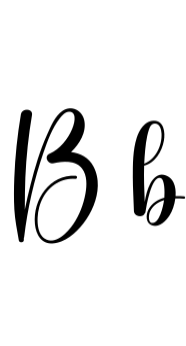
Babycrab Font: The Fun and Playful Handwritten Font for Your Creative Projects
In the world of typography, fonts play a crucial role in conveying the tone and personality of a brand or project. Among the numerous font styles available, handwritten fonts have gained immense popularity for their unique and personal touch. One such font that has caught the attention of designers and creatives is the Babycrab Font. In this article, we’ll dive into the features, benefits, and uses of the Babycrab Font, and explore why it’s an excellent choice for adding a playful and creative vibe to your projects.
What is Babycrab Font?
Babycrab Font is a fun, bold handwritten font with a playful and unique style. Its thick strokes and casual, hand-drawn look give it a friendly and creative vibe, perfect for adding a personal touch to any project. The font’s distinctive characteristics make it an excellent choice for designers, artists, and writers looking to add a touch of whimsy and personality to their work.
📸 Preview Images


💡 Click on any image to view full size
Key Features of Babycrab Font
- Handwritten style: Babycrab Font boasts a genuine handwritten look, making it perfect for projects that require a personal touch.
- Bold and thick strokes: The font’s thick strokes give it a confident and playful appearance, making it suitable for headlines, titles, and emphasis text.
- Unique and creative: Babycrab Font’s distinctive style sets it apart from other fonts, making it an excellent choice for projects that require a touch of originality.
- Easy to read: Despite its bold and playful nature, Babycrab Font remains easy to read, making it suitable for body text and paragraphs.
Benefits of Using Babycrab Font
The Babycrab Font offers several benefits for designers, artists, and writers. Some of the advantages of using this font include:
- Personal touch: Babycrab Font adds a personal touch to your projects, making them more relatable and engaging.
- Creative freedom: The font’s unique style gives you the creative freedom to experiment with different designs and layouts.
- Versatility: Babycrab Font is suitable for a wide range of projects, from digital designs to print materials.
- Time-saving: With Babycrab Font, you can create professional-looking designs quickly and efficiently, saving you time and effort.
Use Cases for Babycrab Font
Babycrab Font is a versatile font that can be used in various projects, including:
- Digital designs: Use Babycrab Font in social media graphics, blog posts, and website headers to add a touch of personality.
- Print materials: The font is suitable for print materials like brochures, flyers, posters, and business cards.
- Branding and logos: Babycrab Font can be used to create unique and memorable logos and brand identities.
- Art and illustration: The font’s playful style makes it an excellent choice for illustrations, comics, and other artistic projects.
Tips for Using Babycrab Font Effectively
To get the most out of Babycrab Font, consider the following tips:
- Use it sparingly: Use Babycrab Font in moderation to avoid overwhelming your design.
- Mix and match: Combine Babycrab Font with other fonts to create a unique and visually appealing design.
- Experiment with colors: Play around with different colors to find the perfect match for your design.
- Pay attention to spacing: Ensure that your text is properly spaced to maintain readability.
Babycrab Font: Access Download Now
| Font Name | Babycrab Font |
| Author | Unknown |
| Download | Access Download Here |
Conclusion
In conclusion, Babycrab Font is a fun, bold handwritten font that adds a playful and creative vibe to any project. Its unique style, thick strokes, and casual look make it an excellent choice for designers, artists, and writers looking to add a personal touch to their work. With its versatility, ease of use, and creative freedom, Babycrab Font is an excellent addition to any design toolkit.
Frequently Asked Questions
- What file formats is Babycrab Font available in?
- Is Babycrab Font free to use?
- Can I use Babycrab Font for commercial projects?
- How do I install Babycrab Font on my computer?
