
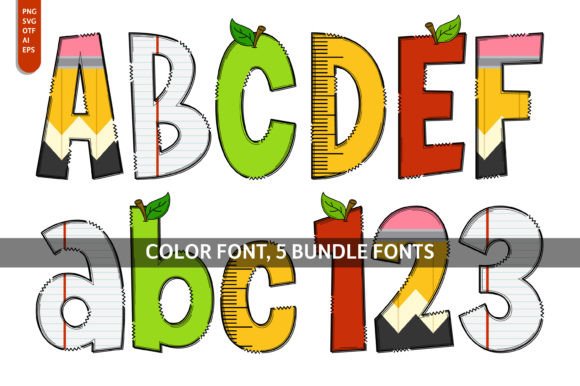
Back to Class Font: Elevate Your Designs with a Playful Touch
The “Back to Class” font is a delightful addition to any design project that aims to convey a sense of playfulness, creativity, and artistic flair. This charming font is particularly popular for projects such as children’s books, educational materials, posters, invitations, greeting cards, and more. In this article, we’ll explore the unique features of the “Back to Class” font, its compatibility with various design software, and provide tips on how to make the most out of this versatile font.
What is the Back to Class Font?
The “Back to Class” font is a color font, specifically an Opentype-SVG (OTF-SVG) file. This innovative font format allows for the inclusion of color and intricate details, making it perfect for designs that require a more personalized and eye-catching approach. Unlike traditional fonts, which are limited to a single color, the “Back to Class” font offers a wide range of colors, enabling designers to create visually stunning and engaging projects.
📸 Preview Images

💡 Click on any image to view full size
Key Features of the Back to Class Font
- Playful and Artistic Feel: The “Back to Class” font is designed to evoke a sense of playfulness and creativity, making it ideal for projects that target a younger audience or require a lighthearted touch.
- Color Font: As an OTF-SVG file, this font supports multiple colors, allowing designers to add depth and dimension to their work.
- Wide Compatibility: The “Back to Class” font is compatible with popular design software such as PhotoShop, Illustrator, Silhouette, and Inkscape.
Compatibility with Design Software
Understanding the compatibility of the “Back to Class” font with various design software is crucial to ensure a smooth design process. Here’s a breakdown of its compatibility:
- PhotoShop: Fully compatible. The OTF-SVG file can be imported and used directly.
- Illustrator: Fully compatible. The font can be used directly in Illustrator, taking advantage of its color capabilities.
- Silhouette: Fully compatible. Users can import and use the font in their Silhouette designs.
- Inkscape: Fully compatible. The font works well within Inkscape, allowing for scalable vector graphics.
- Cricut: Not compatible with OTF and/or TTF files. Users need to follow specific guidelines for using SVG fonts with Cricut.
Tips for Using the Back to Class Font
To make the most out of the “Back to Class” font, consider the following tips:
- Experiment with Colors: Take advantage of the font’s color capabilities by experimenting with different color schemes that match your project’s theme.
- Pair with Complementary Fonts: Combine the “Back to Class” font with other fonts that complement its playful style, enhancing the overall visual appeal of your design.
- Adjust Size and Weight: Play around with the font size and weight to create visual hierarchy and emphasize key elements in your design.
Using the Back to Class Font: A Step-by-Step Guide
For those new to using OTF-SVG fonts or looking for a refresher, here’s a general guide on how to get started:
- Download and Extract: Download the “Back to Class” font files and extract them to a folder on your computer.
- Install the Font: Install the font by right-clicking on the OTF or TTF file and selecting “Install” (for Windows) or dragging the file into the Fonts folder in your Applications folder (for Mac).
- Open Your Design Software: Launch your preferred design software and create a new project.
- Select the Font: In your design software, select the “Back to Class” font from the font dropdown menu.
- Design Your Project: Start designing your project, taking advantage of the font’s features and color capabilities.
Back to Class Font: Access Download Now
| Font Name | Back to Class Font |
| Author | Imagination Switch |
| Download | Access Download Here |
Conclusion
The “Back to Class” font is a versatile and playful font that can elevate your designs with its unique color features and artistic feel. Whether you’re creating educational materials, posters, invitations, or greeting cards, this font is sure to add a touch of whimsy and charm. By understanding its compatibility with various design software and following the tips provided, you can make the most out of this delightful font and create visually stunning projects.
