
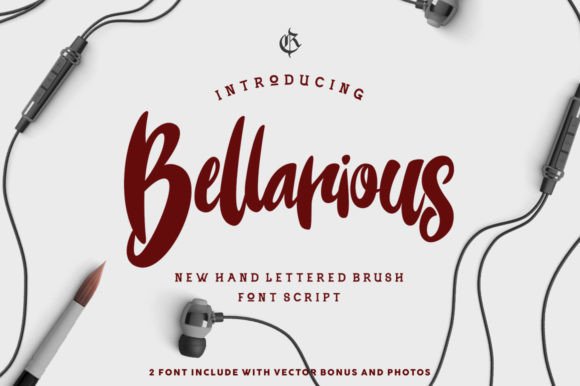
Bellarious Font: Elevate Your Designs with a Touch of Elegance
In the world of typography, few fonts manage to capture the essence of elegance and sophistication as effectively as the Bellarious font. This stunning, brush-lettered typeface, crafted by the talented minds at Rvq Typefoundry, brings a classy, elegant, and vintage feel to any design project. Whether you’re working on a logo, a branding campaign, or simply looking to add a touch of refinement to your digital content, Bellarious is the perfect choice.
What Makes Bellarious Stand Out?
Bellarious is not just another font; it’s an experience. With its beautiful brush-lettered characters, this typeface exudes a sense of luxury and sophistication. The font’s design is characterized by its flowing lines, elegant curves, and a distinct vintage charm that sets it apart from more conventional fonts.
📸 Preview Images


💡 Click on any image to view full size
- Classy and Elegant: Bellarious boasts a high-end look that is perfect for designs that require a touch of sophistication.
- Vintage Feel: The font’s brush-lettered style gives it a nostalgic appeal that can add depth and character to your designs.
- Versatile: Suitable for a wide range of design projects, from logos and branding to digital content and print materials.
Product Content: What You’ll Receive
When you purchase the Bellarious font, you’ll receive the following:
- Bellarious (OTF Format): The primary font file in OpenType format, compatible with most design software.
- Vector Bonus: Additional vector graphics to help you create stunning designs.
Key Features of Bellarious Font
Bellarious comes packed with features that make it incredibly versatile and user-friendly. Some of the key features include:
- Character Set A-Z: A comprehensive set of uppercase and lowercase letters to cover all your typographic needs.
- Numerals & Punctuations: Includes standard OpenType numerals and punctuations for consistency across your designs.
- Accents (Multilingual characters): Support for multilingual characters, allowing you to create content for a global audience.
- Stylistic Alternates: Offers stylistic alternates to give you more flexibility and creativity in your designs.
How to Use Bellarious for Stunning Designs
One of the best things about Bellarious is its versatility. Here are some ideas on how to use this beautiful font:
- Branding and Logos: Create memorable logos and branding materials with a touch of elegance.
- Digital Content: Elevate your blog posts, social media content, and website with a sophisticated font.
- Print Materials: Use Bellarious for brochures, flyers, and business cards to leave a lasting impression.
- Packaging Design: Add a classy touch to your product packaging with this beautiful font.
Tips for Getting the Most Out of Bellarious
To truly make Bellarious shine in your designs, consider the following tips:
- Mix Uppercase and Lowercase: Combining uppercase and lowercase letters can create a visually appealing and dynamic look.
- Utilize Alternative Glyphs: Take advantage of the stylistic alternates and alternative glyphs to add uniqueness to your text.
- Experiment with Colors: While the font itself is elegant, experimenting with different colors can further enhance its beauty.
- Pair with Complementary Fonts: For added contrast, pair Bellarious with a simpler, complementary font for headings and body text.
Bellarious Font: Access Download Now
| Font Name | Bellarious Font |
| Author | Unknown |
| Download | Access Download Here |
Conclusion
Bellarious font by Rvq Typefoundry is a masterpiece that brings elegance, class, and a vintage charm to the world of typography. Its extensive character set, multilingual support, and stylistic alternates make it an incredibly versatile tool for designers. Whether you’re creating a brand identity, crafting digital content, or designing print materials, Bellarious has the potential to elevate your work to new heights. With its beautiful brush-lettered style and comprehensive feature set, Bellarious is not just a font but a design experience waiting to happen.
