
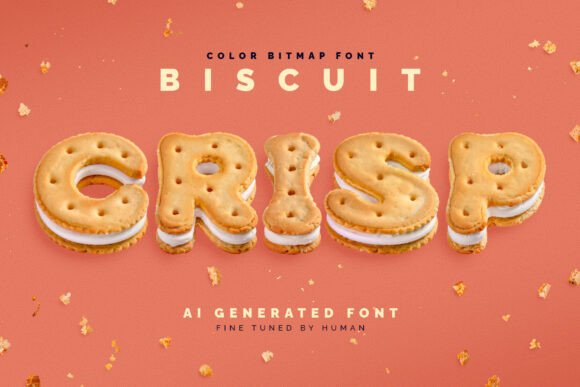
Biscuit Crisp Font: A Deliciously Crunchy Typeface
Are you tired of using the same old fonts for your designs? Look no further than Biscuit Crisp, a revolutionary new font that’s shaped like sandwich cookies. This tasty typeface is sure to add a touch of whimsy and fun to any project. In this article, we’ll take a closer look at Biscuit Crisp, its features, and how you can use it to elevate your designs.

What is Biscuit Crisp?
Biscuit Crisp is a color bitmap OpenType-SVG font that’s designed to look like crunchy sandwich cookies. The font was created using cutting-edge generative AI technology, which allowed for the creation of a unique and intricate design. However, to give it a more human touch, the font was fine-tuned manually. This combination of AI and human expertise has resulted in a font that’s both unique and highly legible.
Key Features of Biscuit Crisp
- Color bitmap OpenType-SVG font: Biscuit Crisp is a color font that uses the OpenType-SVG format, making it compatible with a wide range of software applications.
- Usable like any standard OTF font: Despite being a color font, Biscuit Crisp can be used just like any standard OTF font, making it easy to integrate into your workflow.
- Includes full-resolution PNG files: In addition to the font files, you’ll also receive full-resolution PNG files with transparent backgrounds, perfect for use in designs that require a high level of detail.
- Supports English language and basic punctuation: While Biscuit Crisp is a relatively simple font, it does support the English language and basic punctuation, making it suitable for a wide range of uses.
Technical Details
Biscuit Crisp is a relatively new font, created using cutting-edge technology. As such, there may be some software limitations to consider. However, most popular apps, including Adobe Photoshop, Illustrator, InDesign, Procreate, and Affinity Designer, support color fonts, so you should be able to use Biscuit Crisp with ease.
Software Compatibility
While Biscuit Crisp is compatible with a wide range of software applications, it’s always a good idea to check compatibility before purchasing. Here are some popular apps that support color fonts:
- Adobe Photoshop
- Adobe Illustrator
- Adobe InDesign
- Procreate
- Affinity Designer
Using Biscuit Crisp in Your Designs
Biscuit Crisp is a versatile font that can be used in a wide range of designs, from branding and packaging to digital graphics and more. Here are a few ideas to get you started:
- Branding and packaging: Use Biscuit Crisp to add a touch of whimsy and fun to your brand’s packaging and marketing materials.
- Digital graphics: Biscuit Crisp is perfect for use in digital graphics, such as social media posts, blog headers, and more.
- Advertising and marketing: Use Biscuit Crisp to add a playful touch to your advertising and marketing materials, such as flyers, brochures, and more.
Tips for Using Biscuit Crisp
Here are a few tips to keep in mind when using Biscuit Crisp in your designs:
- Experiment with colors: Biscuit Crisp is a color font, so don’t be afraid to experiment with different colors and combinations.
- Use it sparingly: While Biscuit Crisp is a fun and playful font, it can be overwhelming if used too much. Use it sparingly to add a touch of whimsy to your designs.
- Pair it with other fonts: Biscuit Crisp can be paired with other fonts to create a unique and interesting design. Experiment with different font combinations to find the perfect look for your project.
Biscuit Crisp Font: Access Download Now
| Font Name | Biscuit Crisp Font |
| Author | Gleb Guralnyk |
| Download | Access Download Here |
Conclusion
Biscuit Crisp is a revolutionary new font that’s sure to add a touch of fun and whimsy to any design. With its unique cookie-shaped letters and color bitmap OpenType-SVG format, Biscuit Crisp is perfect for use in a wide range of designs, from branding and packaging to digital graphics and more. Whether you’re a designer, artist, or simply someone who loves fonts, Biscuit Crisp is definitely worth checking out.

Screenshot of Biscuit Crisp font in use. This image shows the full list of available characters.
