
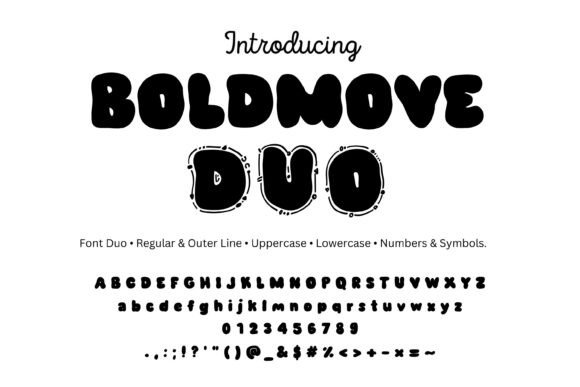
Introducing Boldmove Font: The Ultimate Display Font for Creative Projects
Are you looking for a font that can add a touch of playfulness and fun to your creative projects? Look no further than Boldmove Font, a chunky, bubbly display font duo that’s perfect for a wide range of applications. In this article, we’ll take a closer look at the features and benefits of Boldmove Font, and explore how you can use it to take your designs to the next level.
What is Boldmove Font?
Boldmove Font is a display font duo that consists of two styles: Regular and Outer Line. The Regular style is a bold, chunky font that’s perfect for headlines and titles, while the Outer Line style is a cute doodle outline with stitch dots that’s ideal for adding a touch of whimsy to your designs.
📸 Preview Images


💡 Click on any image to view full size

Key Features of Boldmove Font
Here are some of the key features that make Boldmove Font an excellent choice for your creative projects:
- Full character set: Boldmove Font includes a full A-Z, a-z, 0-9, and punctuation/symbols set for both styles, giving you everything you need to create professional-looking designs.
- Multiple file formats: You’ll receive 2 OTF and 2 TTF files, making it easy to use Boldmove Font in a wide range of applications.
- Cute doodle outline: The Outer Line style features a cute doodle outline with stitch dots that’s perfect for adding a touch of playfulness to your designs.
- Chunky and bold: The Regular style is a bold, chunky font that’s ideal for headlines and titles.
Perfect for a Wide Range of Applications
Boldmove Font is perfect for a wide range of applications, including:
- Stickers: Boldmove Font is ideal for creating stickers, with its bold, chunky lines and cute doodle outline.
- Kids logos: The playful, whimsical design of Boldmove Font makes it perfect for kids logos and branding.
- Party invites: Add a touch of fun and playfulness to your party invites with Boldmove Font.
- Posters: Boldmove Font is perfect for creating eye-catching posters that grab attention.
- YouTube thumbnails: Use Boldmove Font to create bold, eye-catching thumbnails for your YouTube videos.
- Cricut/Silhouette crafts: Boldmove Font is compatible with Cricut Design Space and Silhouette Studio, making it perfect for crafting and DIY projects.
Compatibility and Installation
Boldmove Font is compatible with a wide range of applications and operating systems, including:
- Mac/Windows: Boldmove Font is compatible with both Mac and Windows operating systems.
- Adobe: Boldmove Font works seamlessly with Adobe Creative Cloud applications, including Photoshop and Illustrator.
- Affinity: Boldmove Font is compatible with Affinity Designer and Photo.
- Procreate: Boldmove Font works with Procreate’s text tool.
- MS Office: Boldmove Font is compatible with Microsoft Office applications, including Word and PowerPoint.
Installation is easy:
- Download the font files.
- Unzip the files.
- Double-click each .otf file.
- Install the font.
- Restart your application.
Tips and Tricks
Here are some tips and tricks to help you get the most out of Boldmove Font:
- Pair Regular and Outer Line: Pair the Regular and Outer Line styles for a layered color effect.
- Add a white stroke: Add a white stroke to create a “sticker” edge effect.
- Increase tracking: Increase tracking slightly for big titles and headlines.
Boldmove Font: Access Download Now
| Font Name | Boldmove Font |
| Author | Unknown |
| Download | Access Download Here |
Conclusion
Boldmove Font is a versatile and fun display font duo that’s perfect for a wide range of creative projects. With its bold, chunky lines and cute doodle outline, Boldmove Font is ideal for adding a touch of playfulness and whimsy to your designs. Whether you’re creating stickers, kids logos, party invites, or posters, Boldmove Font is the perfect choice. So why wait? Download Boldmove Font today and start creating!
