
Bopslice Font: A Bold and Playful Handwritten Display Font
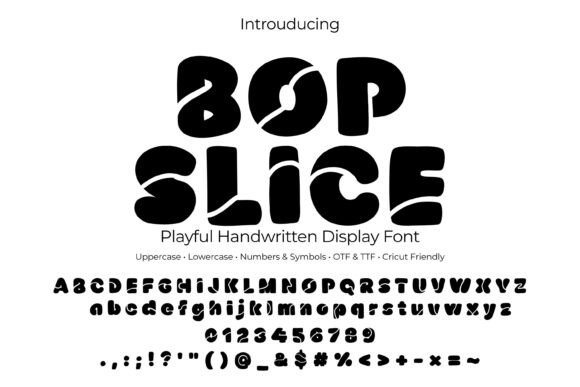
Introducing Bopslice, a bold bubble handwritten display font that is perfect for creating eye-catching titles, logos, and graphics. With its playful “slice” cuts and rounded shapes, Bopslice is ideal for a variety of design projects, from stickers and kids’ posters to party invites and YouTube thumbnails.
What Makes Bopslice Special?
- Bold and Chunky Bubble Letters: Bopslice features thick, bubble-like letters that are sure to grab attention.
- Soft Corners and Sliced Details: The font’s soft corners and fun sliced details add a playful touch to any design.
- Uppercase, Lowercase, Numbers, and Symbols: Bopslice includes a wide range of characters, making it perfect for a variety of design projects.
- OTF and TTF Formats: The font comes in both OTF and TTF formats, ensuring compatibility with a range of design software.
Perfect for a Variety of Design Projects
Bopslice is a versatile font that can be used for a wide range of design projects, including:
📸 Preview Images


💡 Click on any image to view full size
- Stickers: Create eye-catching stickers for parties, events, or everyday use.
- Kids’ Posters: Design fun and engaging posters for kids’ rooms, classrooms, or play areas.
- Party Invites: Create playful and festive party invitations that set the tone for a fun celebration.
- Logos: Use Bopslice to create bold and memorable logos for businesses, events, or products.
- YouTube Thumbnails: Design attention-grabbing thumbnails for YouTube videos.
- Cricut and Silhouette Crafts: Use Bopslice with Cricut Design Space and Silhouette Studio to create custom crafts and DIY projects.
Works with a Range of Software and Devices
Bopslice is compatible with a range of design software and devices, including:
- Mac and Windows: The font works seamlessly on both Mac and Windows operating systems.
- Adobe Creative Cloud: Bopslice is compatible with Adobe Creative Cloud applications, such as Photoshop and Illustrator.
- Affinity Suite: The font works with Affinity Suite applications, including Photo, Designer, and Publisher.
- Microsoft Office: Bopslice can be used in Microsoft Office applications, such as Word, PowerPoint, and Publisher.
- Procreate: The font is compatible with Procreate, a popular digital painting and illustration app.
Easy Installation Guide
Installing Bopslice is easy. Simply follow these steps:
- Download the font file.
- Unzip the file to access the OTF and TTF files.
- Double-click the OTF or TTF file to install it on your computer.
- Restart your design software or application to access the font.
Design Tips and Tricks
Here are some design tips and tricks to help you get the most out of Bopslice:
- Add a White Outline: Add a 24-36px white outline to create kiss-cut stickers.
- Experiment with Colors: Try using candy colors, such as #FFD84D, #7FD3FF, #FF8BA7, and #8CF0A4.
- Adjust Tracking: Increase tracking by 5-10 for big headlines to create a more dramatic effect.
Important Note
Bopslice is a font (OTF/TTF), not an SVG/cut file. This means that it is designed to be used as a font within design software, rather than as a standalone cut file.
What’s Inside
- Bopslice OTF file
- Bopslice TTF file
- Uppercase letters (A-Z)
- Lowercase letters (a-z)
- Numbers (0-9)
- Punctuation and symbols
Bopslice Font: Access Download Now
| Font Name | Bopslice Font |
| Author | Unknown |
| Download | Access Download Here |
