
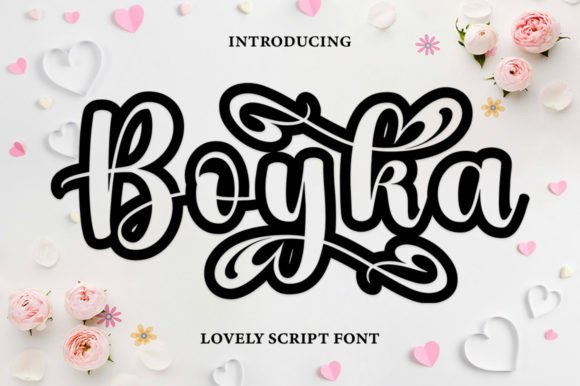
Boyka Outline Font: A Cute and Unique Script Font for Your Creative Projects
In the world of typography, fonts play a crucial role in bringing creative projects to life. A well-chosen font can elevate the visual appeal of a design, convey the right emotions, and leave a lasting impression on the audience. If you’re looking for a font that exudes warmth, romance, and playfulness, look no further than the Boyka Outline Font. In this article, we’ll explore the features, benefits, and uses of this versatile script font.
What is Boyka Outline Font?
Boyka Outline is a cute and unique script font that is designed to add a touch of elegance and whimsy to your creative projects. This font is perfect for designers, artists, and crafters who want to create stunning visuals that capture the essence of their brand or message. With its warm, romantic, and jovial tone, Boyka Outline Font is ideal for a wide range of applications, from wedding invitations and branding materials to social media graphics and digital art.
📸 Preview Images


💡 Click on any image to view full size
Key Benefits of Boyka Outline Font
- Versatile and Flexible: Boyka Outline Font is designed to be versatile and flexible, making it suitable for a wide range of creative projects.
- PUA Coded: This font is PUA (Private Use Area) coded, which means you have easy access to all glyphs and swashes, giving you complete creative control.
- Language Support: Boyka Outline Font comes with language support, making it easy to use for designers and crafters worldwide.
- Easy to Use: With its user-friendly design, Boyka Outline Font is easy to install and use, even for those with limited design experience.
How to Use Boyka Outline Font
Boyka Outline Font is perfect for a wide range of creative projects, including:
- Wedding Invitations: Add a touch of romance and elegance to your wedding invitations with Boyka Outline Font.
- Branding Materials: Use Boyka Outline Font to create stunning branding materials, such as logos, business cards, and brochures.
- Social Media Graphics: Elevate your social media graphics with Boyka Outline Font, perfect for creating engaging posts and stories.
- Digital Art: Boyka Outline Font is ideal for digital artists who want to add a touch of whimsy and elegance to their artwork.
Tips for Using Boyka Outline Font
- Experiment with Swashes: Take advantage of the font’s PUA coding and experiment with different swashes and glyphs to add a personal touch to your designs.
- Mix and Match: Combine Boyka Outline Font with other fonts to create a unique and eye-catching design.
- Pay Attention to Kerning: Make sure to adjust the kerning to ensure that your text looks balanced and visually appealing.
Boyka Outline Font: Access Download Now
| Font Name | Boyka Outline Font |
| Author | Unknown |
| Download | Access Download Here |
Conclusion
In conclusion, Boyka Outline Font is a versatile and unique script font that is perfect for creative projects that require a touch of warmth, romance, and playfulness. With its PUA coding, language support, and ease of use, this font is ideal for designers, artists, and crafters worldwide. Whether you’re creating wedding invitations, branding materials, social media graphics, or digital art, Boyka Outline Font is sure to elevate your designs and leave a lasting impression on your audience.
Resources
- Font Website: Visit the official website of Boyka Outline Font to learn more about this amazing font and download it for your creative projects.
- Design Tutorials: Check out design tutorials and online courses that can help you get the most out of Boyka Outline Font.
- Design Communities: Join design communities and forums to connect with other designers and share your work featuring Boyka Outline Font.
