
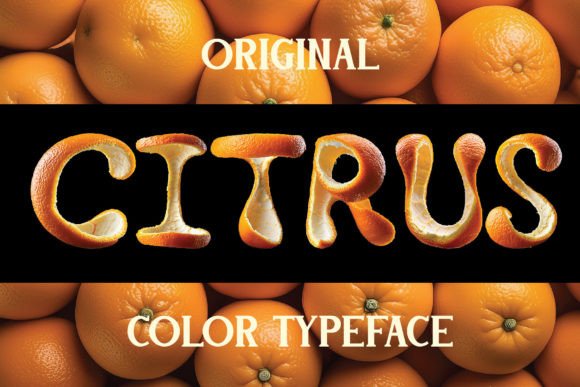
Citrus Font: A Vibrant and Unique Typeface Inspired by Orange Peels
Are you looking for a font that can add a burst of energy and freshness to your designs? Look no further than the Citrus Font, a bright and colorful typeface that features letters made out of orange peels. This innovative font is not only visually striking but also versatile and easy to use, making it perfect for a wide range of design projects.
What is Citrus Font?
Citrus Font is a color bitmap OpenType-SVG font that can be used as a regular OTF font. This means that it can be easily installed and used in most design software, including Adobe Photoshop, Illustrator, and Silhouette. The font features a unique and colorful design, with each letter made up of intricate orange peel patterns that give it a textured and organic feel.
Key Features of Citrus Font
High-Resolution Design
The Citrus Font has a high-resolution design, with an OTF file that boasts a height of 500px. This ensures that the font looks crisp and clear, even when used at large sizes. Additionally, the included PNG file has a transparent background and a height of approximately 4000px, making it perfect for use in high-resolution designs.
Language and Character Support
It’s worth noting that the Citrus Font currently only supports the English language and basic punctuation. However, the font includes a wide range of characters, including uppercase and lowercase letters, numbers, and common symbols. You can view a screenshot of all the available characters to ensure that it meets your needs.
Compatibility
The Citrus Font is compatible with a range of design software, including Adobe Photoshop, Illustrator, Silhouette, and Inkscape. However, it’s essential to note that the OTF and TTF files are not compatible with Cricut machines. If you’re planning to use the font with a Cricut, you’ll need to explore alternative options or conversion methods.
Using Citrus Font: Tips and Tricks
To get the most out of the Citrus Font, it’s essential to understand how to use it effectively. Here are a few tips and tricks to get you started:
Experiment with Color
One of the unique features of the Citrus Font is its colorful design. Don’t be afraid to experiment with different colors and combinations to find the perfect look for your design. You can use the font’s colorful design to add a pop of color to your text or create a cohesive brand identity.
Play with Texture and Pattern
The Citrus Font’s textured design makes it perfect for creating unique and eye-catching patterns. Try combining the font with other textures and patterns to create a visually striking design. You can use the font to add a tactile feel to your text or create a bold and eye-catching background.
The Ultimate Font Guide: Getting the Most out of Citrus Font
To ensure that you get the most out of the Citrus Font, be sure to check out the Ultimate Font Guide. This comprehensive guide provides detailed information on how to use OpenType-SVG fonts, including installation instructions, troubleshooting tips, and creative ideas for using the font.
Citrus Font: Access Download Now
| Font Name | Citrus Font |
| Author | Vozzy Vintage Fonts And Graphics |
| Download | Access Download Here |
Conclusion
The Citrus Font is a unique and vibrant typeface that can add a burst of energy and freshness to your designs. With its high-resolution design, colorful bitmap OpenType-SVG font, and compatibility with a range of design software, it’s perfect for a wide range of design projects. By following the tips and tricks outlined in this article and consulting the Ultimate Font Guide, you can unlock the full potential of the Citrus Font and create stunning designs that showcase its unique features.
Technical Specifications
- Font Type: Color bitmap OpenType-SVG font
- Resolution: 500px height (OTF file), approximately 4000px height (PNG file)
- Language Support: English language and basic punctuation
- Character Set: Uppercase and lowercase letters, numbers, and common symbols
- Compatible Software: Adobe Photoshop, Illustrator, Silhouette, and Inkscape
- File Formats: OTF, TTF, PNG
