
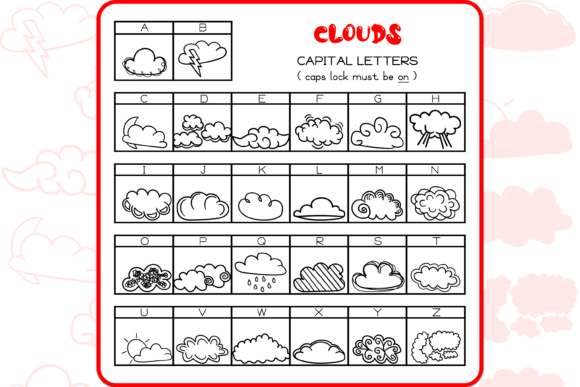
Clouds Dingbats Font: Elevate Your Designs with Fluffy Cloud Doodles
Are you looking for a unique and creative way to add a touch of whimsy to your designs? Look no further than the Clouds Dingbats Font, a set of 52 hand-drawn doodles of fluffy clouds that can be used as borders, dividers, frames, and more. In this article, we’ll explore the features and benefits of this delightful font and show you how to use it to take your designs to the next level.
What is Clouds Dingbats Font?
Clouds Dingbats Font is a set of 52 hand-drawn doodles of fluffy clouds, carefully crafted to add a touch of playfulness and creativity to your designs. Each cloud doodle is unique, with varying shapes, sizes, and textures, ensuring that your designs will never look repetitive or boring.
📸 Preview Images


💡 Click on any image to view full size
This font is perfect for designers, artists, and crafty enthusiasts who want to add a personal touch to their work. Whether you’re creating invitations, greeting cards, social media graphics, or blog posts, Clouds Dingbats Font is sure to inspire your creativity.
Features of Clouds Dingbats Font
- 52 unique cloud doodles: Each doodle is carefully hand-drawn to ensure that your designs stand out from the crowd.
- Variety of shapes and sizes: The cloud doodles come in different shapes and sizes, allowing you to choose the perfect one for your design.
- Easy to use: Simply copy and paste the cloud doodles into your design software, and you’re good to go!
- Compatible with most design software: Clouds Dingbats Font is compatible with popular design software, including Adobe Illustrator, Photoshop, and Canva.
Using Clouds Dingbats Font in Your Designs
So, how can you use Clouds Dingbats Font in your designs? Here are a few ideas to get you started:
- Borders and frames: Use the cloud doodles as borders or frames to add a touch of whimsy to your designs.
- Dividers: Use the cloud doodles as dividers to separate sections of text or images.
- Decorative elements: Add the cloud doodles to your designs as decorative elements, such as around headings or subheadings.
- Backgrounds: Use the cloud doodles as backgrounds to create a playful and eye-catching design.
Benefits of Using Clouds Dingbats Font
So, why should you use Clouds Dingbats Font in your designs? Here are just a few benefits:
- Unique and creative: Clouds Dingbats Font adds a touch of uniqueness and creativity to your designs, setting them apart from the rest.
- Easy to use: The font is easy to use, even for those with limited design experience.
- Time-saving: With 52 cloud doodles to choose from, you can quickly and easily add a decorative element to your designs.
- Cost-effective: Clouds Dingbats Font is an affordable solution for adding a creative touch to your designs.
Tips and Tricks for Using Clouds Dingbats Font
Here are a few tips and tricks for getting the most out of Clouds Dingbats Font:
- Experiment with different sizes and colors: Try out different sizes and colors to see what works best for your design.
- Combine with other fonts: Combine Clouds Dingbats Font with other fonts to create a unique and eye-catching design.
- Use as a background: Use the cloud doodles as a background to create a playful and eye-catching design.
- Add texture and depth: Add texture and depth to your design by layering the cloud doodles.
Clouds Dingbats Font: Access Download Now
| Font Name | Clouds Dingbats Font |
| Author | Unknown |
| Download | Access Download Here |
Conclusion
Clouds Dingbats Font is a unique and creative way to add a touch of whimsy to your designs. With 52 hand-drawn cloud doodles to choose from, you’re sure to find the perfect one to elevate your designs. Whether you’re a designer, artist, or crafty enthusiast, Clouds Dingbats Font is a must-have in your design toolkit.
Frequently Asked Questions
- What file format is Clouds Dingbats Font?: Clouds Dingbats Font is available in [insert file format, e.g. OTF, TTF, etc.].
- Can I use Clouds Dingbats Font for commercial projects?: Yes, Clouds Dingbats Font can be used for commercial projects, including but not limited to, designing logos, brochures, and websites.
- How do I install Clouds Dingbats Font?: Simply download the font file and follow the installation instructions for your operating system.
