
Clucks and Peeps Font: A Comprehensive Guide to Dingbat Fonts for Creative Projects
If you’re a crafty person who loves working with vinyl cutters, heat presses, or other creative tools, you’re probably always on the lookout for unique and fun fonts to add to your projects. That’s where the Clucks and Peeps Font bundle comes in – a delightful collection of two dingbat fonts featuring cute chicks, chickens, roosters, and Easter imagery. In this article, we’ll dive into the details of this fantastic font bundle, explore its features, and discuss how to use it with various software and machines.
What is a Dingbat Font?
A dingbat font is a type of font that consists of symbols, icons, or graphics rather than traditional letters and numbers. These fonts are often used for decorative purposes, adding a touch of personality and whimsy to various projects, such as signs, cards, and crafts. Dingbat fonts can be especially useful for creating visual interest and emphasis in designs.
📸 Preview Images


💡 Click on any image to view full size
Clucks and Peeps Font Bundle: An Overview
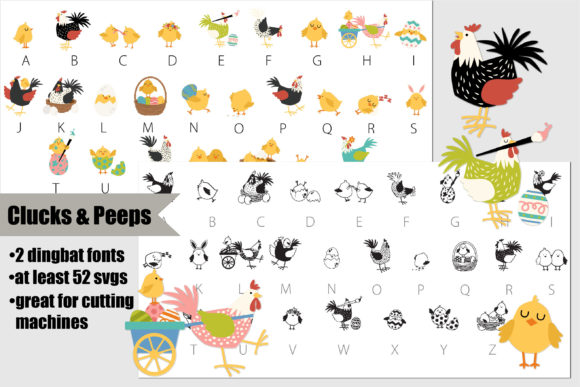
The Clucks and Peeps Font bundle includes two distinct dingbat fonts:
- A traditional, black and white dingbat font featuring cute chicks, chickens, roosters, and Easter imagery.
- A full-color SVG dingbat font with the same adorable characters and imagery.
The first font is perfect for those who prefer a classic, monochromatic look, while the second font offers a vibrant, full-color option that’s ideal for projects that require a pop of color.
What are SVG Fonts?
SVG stands for Scalable Vector Graphics, which is a format used for creating vector graphics. In the context of fonts, SVG refers to a type of font that uses vector graphics to render the characters. This allows for scalable, high-quality graphics that can be used at various sizes without losing any detail.
SVG fonts are particularly useful for cutting machines, vinyl projects, and other applications where high-quality graphics are essential.
Installing and Using Clucks and Peeps Font
Installing the Clucks and Peeps Font bundle is relatively straightforward. Here’s a step-by-step guide:
Mac Users:
- Download the font bundle and save it to your computer.
- Open Font Book, which is a built-in font manager on Macs.
- Click on the “+” icon at the bottom left corner of the Font Book window.
- Navigate to the location where you saved the font bundle and select it.
- Click “Open” to install the fonts.
Windows Users:
- Download the font bundle and save it to your computer.
- Go to the Control Panel and click on “Fonts.”
- Click on “File” and then “Install new font.”
- Navigate to the location where you saved the font bundle and select it.
- Click “OK” to install the fonts.
Using Clucks and Peeps Font with Creative Software
The Clucks and Peeps Font bundle is compatible with various creative software, including:
- Adobe products (e.g., Illustrator, Photoshop)
- Silhouette Studio
- Quark
- Inkscape
When using the font with these programs, you should see the full-color SVG graphics rendered correctly. However, please note that some programs may display the font as black or not show the colors correctly.
Tips and Tricks for Working with Clucks and Peeps Font
Here are a few tips to help you get the most out of the Clucks and Peeps Font bundle:
- Experiment with different sizes and colors to find the perfect look for your project.
- Use the font with other creative elements, such as patterns, textures, and shapes, to add visual interest.
- Take advantage of the full-color SVG font for vinyl projects, heat transfers, and other applications where vibrant colors are essential.
Clucks and Peeps Font: Access Download Now
| Font Name | Clucks and Peeps Font |
| Author | Unknown |
| Download | Access Download Here |
Conclusion
The Clucks and Peeps Font bundle is a fantastic resource for crafty people, designers, and anyone looking to add a touch of whimsy to their projects. With its two unique dingbat fonts, including a traditional black and white option and a full-color SVG font, you’ll have endless creative possibilities at your fingertips. By following the installation and usage guidelines outlined in this article, you’ll be able to get started with the Clucks and Peeps Font bundle and create amazing projects that showcase your personality and style.
