
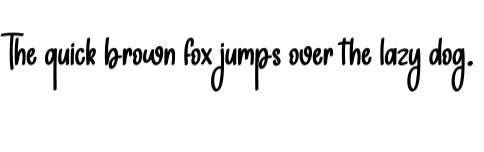
Elevate Your Typography with Color Overlay Font: A Comprehensive Guide
When it comes to making a statement with typography, few design elements can match the impact of a Color Overlay Font. This innovative design technique involves adding a bold, hand-drawn color layer over text, instantly making the font stand out with vibrant colors and a creative, personal touch. In this article, we’ll explore the world of Color Overlay Fonts, their benefits, and how to effectively use them in your designs.
What is Color Overlay?
Color Overlay is a design effect that adds a bold, hand-drawn color layer over text. It makes the font stand out with vibrant colors and a creative, personal touch. This technique is perfect for designers looking to add a unique flair to their typography, making it more engaging and attention-grabbing.
📸 Preview Images


💡 Click on any image to view full size

The Benefits of Using Color Overlay Fonts
So, why should you consider using Color Overlay Fonts in your designs? Here are just a few benefits:
- Enhanced Visual Appeal: Color Overlay Fonts add a pop of color to your design, making it more visually appealing and engaging.
- Increased Legibility: By adding a bold color layer over the text, you can improve the legibility of your font, especially on busy or dark backgrounds.
- Creative Expression: Color Overlay Fonts offer a wide range of creative possibilities, allowing you to experiment with different colors, patterns, and textures.
- Branding and Identity: Consistent use of Color Overlay Fonts can help establish a strong brand identity and make your designs more recognizable.
Types of Color Overlay Fonts
Color Overlay Fonts come in a variety of styles, each with its own unique characteristics. Here are some popular types:
- Hand-Drawn Overlays: These overlays feature hand-drawn, irregular shapes and lines, adding a personal, organic touch to your typography.
- Geometric Overlays: Geometric overlays feature shapes and patterns created from geometric forms, such as triangles, circles, and squares.
- Watercolor Overlays: Watercolor overlays mimic the soft, blended look of watercolor painting, adding a touch of elegance and sophistication to your typography.
- Glitch Overlays: Glitch overlays feature distorted, fragmented shapes and lines, giving your typography a bold, edgy look.
How to Create a Color Overlay Font
Creating a Color Overlay Font is easier than you might think. Here’s a step-by-step guide:
- Choose a Font: Select a font that you want to use as the base for your Color Overlay Font. You can use a pre-existing font or create your own custom font.
- Design Your Overlay: Create a new layer or element that will serve as the overlay. This can be a shape, a pattern, or a texture.
- Apply the Overlay: Place the overlay layer on top of your text, adjusting the position, size, and opacity as needed.
- Experiment and Refine: Play around with different colors, patterns, and textures to find the perfect combination for your design.
Best Practices for Using Color Overlay Fonts
To get the most out of Color Overlay Fonts, follow these best practices:
- Use Contrasting Colors: Choose colors that contrast with the background and the text, making it easier to read and understand.
- Balance Overlay and Text: Balance the overlay and text elements to avoid overwhelming the viewer.
- Consider Legibility: Ensure that the overlay doesn’t compromise the legibility of the text.
- Experiment and Iterate: Don’t be afraid to try new things and iterate on your design until you find the perfect solution.
Tools and Resources for Creating Color Overlay Fonts
Here are some tools and resources to help you create stunning Color Overlay Fonts:
- Adobe Illustrator: A powerful vector graphics editor ideal for creating custom overlays and typography.
- Canva: A popular design platform that offers a range of templates, fonts, and design elements.
- Font Overlay Templates: Pre-made templates that allow you to easily create Color Overlay Fonts.
- Graphic Design Communities: Online communities and forums where you can find inspiration, resources, and feedback on your designs.
Color Overlay Font: Access Download Now
| Font Name | Color Overlay Font |
| Author | Unknown |
| Download | Access Download Here |
Conclusion
Color Overlay Fonts offer a creative and effective way to elevate your typography and make your designs stand out. By understanding the benefits, types, and best practices for using Color Overlay Fonts, you can take your designs to the next level and create stunning visual experiences. So, don’t be afraid to experiment and push the boundaries of what’s possible with Color Overlay Fonts!
