
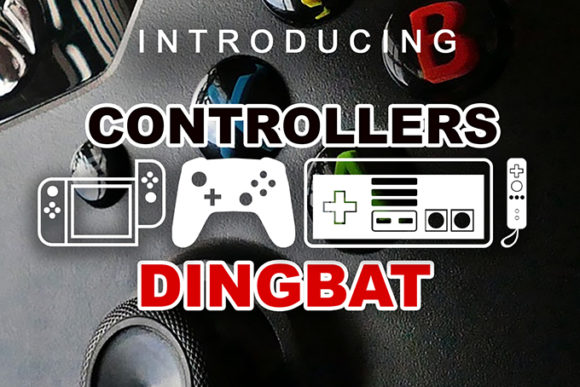
Controllers Font: The Ultimate Gaming Console Icons for Your Designs
Are you a gamer, a designer, or a developer looking for a unique and awesome font to enhance your digital projects? Look no further than Controllers Font, an incredible dingbats font that features a wide range of gaming consoles, controllers, and video game icons. In this article, we’ll dive into the world of Controllers Font, exploring its features, benefits, and uses, as well as provide tips on how to make the most of this amazing font.
What is Controllers Font?
Controllers Font is a specially designed dingbats font that contains a vast collection of gaming-related icons, including various gaming consoles, controllers, and video game symbols. This font is perfect for anyone who wants to add a touch of gaming flair to their digital designs, such as websites, apps, games, or social media posts.
📸 Preview Images


💡 Click on any image to view full size
With Controllers Font, you can easily insert gaming console icons, like PlayStation, Xbox, Nintendo Switch, and more, into your text or designs. This font is also ideal for creating gaming-themed content, such as logos, banners, or infographics.
Features of Controllers Font
Controllers Font comes with an impressive set of features that make it a must-have for any designer or gamer:
- Wide range of icons: The font includes a vast collection of gaming console icons, controllers, and video game symbols, ensuring you have everything you need to create amazing designs.
- Easy to use: Controllers Font is a dingbats font, which means you can use it just like any other font in your design software. Simply select the icon you want, and it’s ready to go!
- Scalable: The font is designed to be scalable, ensuring that your icons look great in any size or resolution.
- Cross-platform compatibility: Controllers Font works seamlessly across various platforms, including Windows, macOS, and Linux.
Benefits of Using Controllers Font
So, why should you choose Controllers Font for your designs? Here are just a few benefits:
- Unique and eye-catching designs: With Controllers Font, you can create stunning gaming-themed designs that will grab the attention of gamers and non-gamers alike.
- Time-saving: The font’s extensive library of icons saves you time and effort, as you don’t need to search for individual icons or create them from scratch.
- Consistency: Using Controllers Font ensures consistency across your designs, as all icons are part of a single, cohesive set.
- Customization: You can easily customize the icons to fit your brand’s style and color scheme.
How to Use Controllers Font
Using Controllers Font is straightforward:
- Download and install the font: Simply download the font file and install it on your computer.
- Select the font in your design software: Choose Controllers Font in your design software, such as Adobe Illustrator or Canva.
- Browse the icon library: Browse through the font’s extensive library of icons and select the ones you want to use.
- Customize and enjoy: Customize the icons to fit your design and enjoy the awesomeness of Controllers Font!
Tips and Tricks for Making the Most of Controllers Font
Here are some tips to help you get the most out of Controllers Font:
- Experiment with different sizes and colors: Don’t be afraid to try out different sizes and colors to create visually appealing designs.
- Combine with other fonts: Mix Controllers Font with other fonts to create unique and interesting typography.
- Use in conjunction with gaming-themed graphics: Combine Controllers Font with gaming-themed graphics, such as backgrounds or textures, to create immersive designs.
- Keep it consistent: Use Controllers Font consistently across your designs to create a cohesive brand identity.
Controllers Font: Access Download Now
| Font Name | Controllers Font |
| Author | Unknown |
| Download | Access Download Here |
Conclusion
Controllers Font is an awesome dingbats font that is a must-have for any gamer, designer, or developer looking to add a touch of gaming flair to their digital designs. With its wide range of gaming console icons, controllers, and video game symbols, this font is perfect for creating stunning gaming-themed designs. By following the tips and tricks outlined in this article, you’ll be able to make the most of Controllers Font and take your designs to the next level.
Frequently Asked Questions
- What is Controllers Font?
- Controllers Font is a dingbats font featuring a wide range of gaming console icons, controllers, and video game symbols.
- Is Controllers Font free?
- Please check the licensing terms and conditions for more information on using Controllers Font.
- Can I use Controllers Font for commercial projects?
- Yes, Controllers Font can be used for commercial projects, but please ensure you comply with the licensing terms and conditions.
