
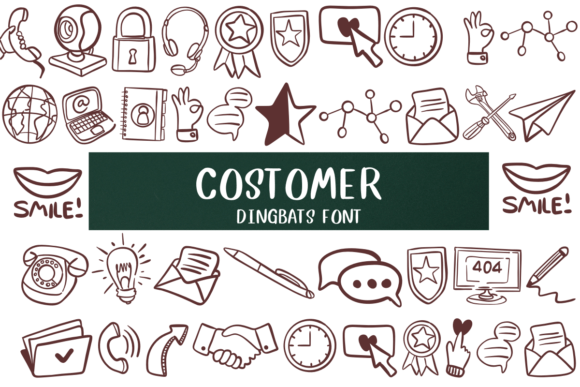
Introducing Costomer Font: The Fun and Playful Dingbat Font
Are you tired of using the same old boring fonts in your projects? Look no further than Costomer Font, a fun and playful dingbat font that’s sure to add a creative touch to your designs. In this article, we’ll take a closer look at Costomer Font, its features, and how you can use it to take your projects to the next level.
What is Costomer Font?
Costomer Font is a unique dingbat font that replaces traditional letters with cute pictures of various objects, such as a clock, e-mail, and other everyday items. This font is perfect for designers, artists, and crafty people who want to add a playful and whimsical touch to their work.
Features of Costomer Font
- Cute and Playful Images: Costomer Font features a wide range of adorable images that are sure to bring a smile to your face. From a simple clock to a computer, this font has it all.
- Easy to Use: Costomer Font is incredibly easy to use, even for those who are new to design. Simply install the font on your computer, and you’re ready to go.
- Versatile: Costomer Font can be used in a variety of projects, from digital designs to print projects, and even crafts.
- Fun and Creative: This font is perfect for those who want to add a playful touch to their work. It’s ideal for designs that require a bit of whimsy and personality.
How to Use Costomer Font
Using Costomer Font is incredibly easy. Here are the steps to get started:
- Download and Install the Font: Simply download the Costomer Font file and install it on your computer.
- Choose a Design Program: Open your favorite design program, such as Adobe Illustrator or Canva.
- Select Costomer Font: Choose Costomer Font from your font list, and you’re ready to start designing.
- Get Creative!: Use the various images in Costomer Font to add a playful touch to your designs.
Project Ideas Using Costomer Font
Costomer Font can be used in a variety of projects, including:
- Digital Invitations: Add a playful touch to your digital invitations with Costomer Font.
- Social Media Graphics: Use Costomer Font to create fun and engaging social media graphics.
- Print Projects: Costomer Font is perfect for print projects, such as brochures, flyers, and posters.
- Crafts: Use Costomer Font to add a personal touch to your crafts, such as scrapbooking and card making.
Tips and Tricks for Using Costomer Font
Here are a few tips and tricks to keep in mind when using Costomer Font:
- Experiment with Different Sizes: Don’t be afraid to experiment with different font sizes to achieve the desired effect.
- Combine with Other Fonts: Combine Costomer Font with other fonts to create a unique and interesting design.
- Use in Combination with Images: Use Costomer Font in combination with images to add an extra layer of interest to your design.
Costomer Font: Access Download Now
| Font Name | Costomer Font |
| Author | Unknown |
| Download | Access Download Here |
Conclusion
In conclusion, Costomer Font is a fun and playful dingbat font that’s perfect for adding a creative touch to your projects. With its wide range of cute and playful images, ease of use, and versatility, this font is sure to become a favorite among designers, artists, and crafty people. So why not give Costomer Font a try and see how it can add a playful touch to your designs?
Frequently Asked Questions
- What is a dingbat font?: A dingbat font is a type of font that features images or symbols instead of traditional letters.
- Is Costomer Font free?: Costomer Font may be available for free or for purchase, depending on the source.
- Can I use Costomer Font for commercial projects?: Yes, Costomer Font can be used for commercial projects, but be sure to check the licensing terms and conditions.
