
Crayon Wrapper Font: A Colorful Addition to Your Design Arsenal
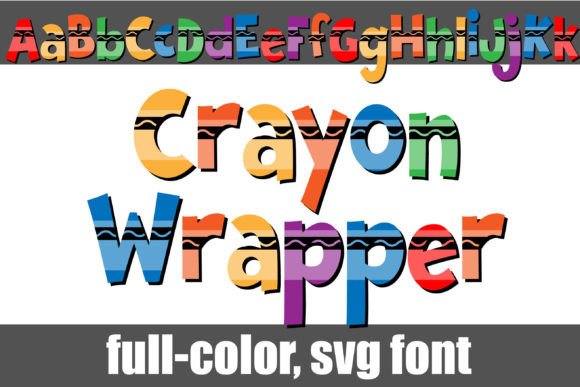
The world of typography has witnessed a significant transformation over the years, with designers continually seeking innovative ways to add visual appeal to their work. One such exciting development is the emergence of full-color fonts, and the Crayon Wrapper Font is a stunning example of this trend. Inspired by the vibrant colors of crayons, this font is sure to bring a pop of color to your designs.
What is Crayon Wrapper Font?
The Crayon Wrapper Font is a unique, full-color font that draws inspiration from the classic crayon wrappers we all grew up with. Each letter is meticulously designed to resemble a crayon wrapper, complete with bright, bold colors that are sure to capture attention. This font is not only visually appealing but also versatile, making it suitable for a wide range of design projects, from branding and advertising to packaging and digital media.
📸 Preview Images

💡 Click on any image to view full size
Key Features of Crayon Wrapper Font
- Full-Color Design: The font features a vibrant, full-color design that adds a playful touch to any project.
- Alt Version with Additional Colors: An alternative version of the font is available through your system’s character map, offering additional colors for all letters.
- OpenType Full-Color (SVG) Fonts: The font is compatible with OpenType full-color (SVG) font technology, allowing for easy installation and use across various platforms.
Installation and Compatibility
Installing the Crayon Wrapper Font is straightforward and similar to installing any other .otf font. Here’s how you can do it:
For Mac Users:
Mac users can install the font using FontBook. Simply follow these steps:
- Download the font file.
- Open FontBook, which is usually found in the Applications > Utilities folder.
- Click on the “+” button at the bottom of the font list.
- Navigate to the downloaded font file and select it.
- Click “Open” to install the font.
For Windows Users:
Windows users can install the font via the Control Panel or a preferred font manager. Here’s how:
- Download the font file.
- Open the Control Panel and navigate to “Appearance and Personalization” > “Fonts”.
- Drag and drop the downloaded font file into the Fonts window.
- Alternatively, right-click on the font file and select “Install”.
Software Compatibility
While the Crayon Wrapper Font is compatible with many modern design programs, it’s essential to note that color fonts may not display correctly in all software. The font will show as black in non-compatible programs. Even in programs that support color fonts, the font may appear as black in the preview window. You’ll know if your program supports color fonts when you see the text in color in your document.
Supported Software:
Some of the popular programs that currently support full-color SVG fonts like Crayon Wrapper include:
- Adobe products (e.g., Photoshop, Illustrator)
- Silhouette Studio
- Quark
- Inkscape
Using Crayon Wrapper Font in Your Designs
Once you’ve installed the Crayon Wrapper Font, using it in your designs is easy. Here’s a basic guide:
- Open your design program and create a new document.
- Select the Crayon Wrapper Font from your font list.
- Type your text as you normally would.
- If the program supports color fonts, your text should appear in vibrant color.
Tips for Getting the Most Out of Crayon Wrapper Font
- Experiment with Different Sizes: The font’s color details may be more pronounced at larger sizes.
- Combine with Other Fonts: Pair the Crayon Wrapper Font with complementary fonts for added visual interest.
- Use in Branding and Packaging: The font’s playful, colorful design makes it perfect for branding and packaging projects aimed at a younger audience.
Crayon Wrapper Font: Access Download Now
| Font Name | Crayon Wrapper Font |
| Author | Illustration Ink |
| Download | Access Download Here |
Conclusion
The Crayon Wrapper Font is a delightful addition to any designer’s toolkit. Its vibrant, full-color design inspired by crayon wrappers is sure to add a playful touch to your projects. While ensuring compatibility with your design software is crucial, the creative possibilities with this font are vast. Whether you’re working on a children’s book, a colorful brand identity, or simply looking to add some whimsy to your designs, the Crayon Wrapper Font is an excellent choice.
