
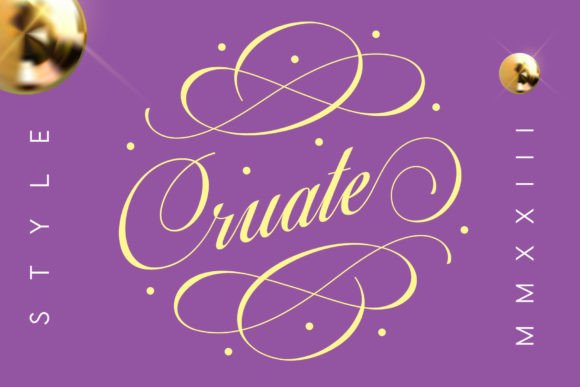
Cruate Font: Elevate Your Designs with Elegant Calligraphy
In the world of design, fonts play a crucial role in conveying the message and aesthetic of a project. For those seeking to add a touch of elegance and sophistication, the Cruate Font is an excellent choice. This beautiful calligraphy font is perfect for creating stunning compositions that leave a lasting impression. In this article, we’ll explore the features and benefits of the Cruate Font and how it can elevate your designs.
What is Cruate Font?
Cruate is a gorgeous calligraphy font designed to help designers create breathtaking compositions. Its elegant and flowing lines make it an ideal choice for a variety of design projects, including wedding invitations, cards, quotes, greeting cards, logos, business cards, and more. With Cruate, you can add a customized touch to your designs and make them stand out from the crowd.
📸 Preview Images


💡 Click on any image to view full size

Key Features of Cruate Font
Cruate Font comes with several key features that make it a versatile and user-friendly choice for designers. Some of its notable features include:
- PUA Encoding: Cruate Font is PUA (Private Use Area) encoded, which means you can access all the glyphs and swashes with ease. This feature allows you to unlock the full potential of the font and experiment with different design elements.
- Ligatures: The font includes ligatures, which are special characters that combine two or more letters to create a beautiful, flowing effect. To create ligatures, simply type the text and move the decor elements into the right position.
- Glyphs Category: Cruate Font also includes a Glyphs category, where you can choose from a range of decorative elements to enhance your designs.
How to Use Cruate Font
Using Cruate Font is straightforward and easy. Here’s a step-by-step guide to get you started:
- Type Your Text: Type the text you want to use in your design. You can type any text, including quotes, phrases, or words.
- Add Decor Elements: To add decor elements, simply type == (equal signs) or any text==========. This will create the main decor element.
- Move Decor Elements: Move the decor elements into the right position to create a beautiful composition. Don’t change the size of the text during this process, as it may not create the ligatures.
- Choose from Glyphs Category: Alternatively, you can choose from the Glyphs category to add decorative elements to your design.
Benefits of Using Cruate Font
Cruate Font offers several benefits to designers, including:
- Elegant and Sophisticated: Cruate Font adds an elegant and sophisticated touch to your designs, making them perfect for special occasions and high-end projects.
- Versatile: The font is versatile and can be used for a range of design projects, from wedding invitations to business cards.
- Easy to Use: Cruate Font is easy to use, even for those with limited design experience.
- PUA Encoding: The font’s PUA encoding makes it easy to access all the glyphs and swashes, giving you more creative freedom.
Tips and Tricks for Using Cruate Font
Here are some tips and tricks to help you get the most out of Cruate Font:
- Experiment with Different Sizes: Try experimenting with different font sizes to create a unique and eye-catching design.
- Combine with Other Fonts: Combine Cruate Font with other fonts to create a contrasting effect and add visual interest to your design.
- Use on Different Backgrounds: Try using Cruate Font on different backgrounds to create a unique and eye-catching effect.
Cruate Font: Access Download Now
| Font Name | Cruate Font |
| Author | Unknown |
| Download | Access Download Here |
Conclusion
Cruate Font is a beautiful calligraphy font that can elevate your designs and add an elegant touch. With its PUA encoding, ligatures, and Glyphs category, it’s easy to use and versatile. Whether you’re designing wedding invitations, business cards, or quotes, Cruate Font is an excellent choice. By following the tips and tricks outlined in this article, you can unlock the full potential of Cruate Font and create stunning compositions that leave a lasting impression.
