
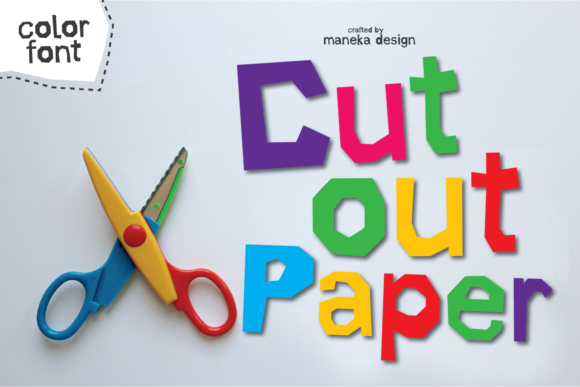
Introducing Cut Out Paper Font: A Crafting-Themed Color Font
Are you a crafting enthusiast looking for a unique and creative way to express yourself? Look no further than the Cut Out Paper Font, a crafting-themed color font that is sure to inspire your next DIY project. This font features a cutout paper style that is perfect for making your designs stand out.
What is Cut Out Paper Font?
Cut Out Paper Font is a specially designed color font that mimics the look of cutout paper. It includes uppercase and lowercase letters, numbers, and punctuation, making it a versatile font that can be used for a wide range of projects. The font comes with 8 alternate colors for the uppercase and lowercase glyphs, giving you plenty of options to customize your designs.
Key Features of Cut Out Paper Font
- Color Font: Cut Out Paper Font is a color font (Opentype-SVG) that allows you to use it in a variety of design software, including PhotoShop, Illustrator, Silhouette, and Inkscape.
- PUA Encoded: The font is PUA encoded, which means you can access all of the glyphs with ease.
- 8 Alternate Colors: The font comes with 8 alternate colors for the uppercase and lowercase glyphs, giving you plenty of options to customize your designs.
- Compatibility: The font is compatible with PhotoShop, Illustrator, Silhouette, and Inkscape. However, the OTF and/or TTF files are not compatible with Cricut.
How to Use Cut Out Paper Font
Using Cut Out Paper Font is easy. Once you’ve downloaded the font, you can install it on your computer and start using it in your design software. Here are a few tips to get you started:
- Choose Your Software: Cut Out Paper Font can be used in a variety of design software, including PhotoShop, Illustrator, Silhouette, and Inkscape.
- Select Your Text: Type out your text using the Cut Out Paper Font.
- Customize Your Design: Use the 8 alternate colors to customize your design and make it stand out.
Tips and Tricks for Using Cut Out Paper Font
Here are a few tips and tricks to help you get the most out of Cut Out Paper Font:
- Experiment with Colors: Don’t be afraid to try out different color combinations to find the one that works best for your design.
- Use it for Crafting Projects: Cut Out Paper Font is perfect for crafting projects, such as making cards, gift tags, and other DIY projects.
- Combine with Other Fonts: Try combining Cut Out Paper Font with other fonts to create a unique and interesting design.
Ultimate Font Guide
If you’re new to using color fonts like Cut Out Paper Font, you may want to check out our Ultimate Font Guide. This guide provides detailed information on how to use color fonts, including how to access the glyphs and how to use them in different design software.
Cut out Paper Font: Access Download Now
| Font Name | Cut out Paper Font |
| Author | maneka |
| Download | Access Download Here |
Conclusion
Cut Out Paper Font is a unique and creative way to add a personal touch to your crafting projects. With its cutout paper style and 8 alternate colors, this font is sure to inspire your next DIY project. Whether you’re a seasoned crafter or just starting out, Cut Out Paper Font is a great addition to your design toolkit.
FAQs
- What is a color font? A color font is a type of font that allows you to use multiple colors in a single font.
- What design software is Cut Out Paper Font compatible with? Cut Out Paper Font is compatible with PhotoShop, Illustrator, Silhouette, and Inkscape.
- Can I use Cut Out Paper Font with Cricut? No, the OTF and/or TTF files of Cut Out Paper Font are not compatible with Cricut.
