
Design Elements Font: Elevate Your Creative Projects with a Unique Sketch Style
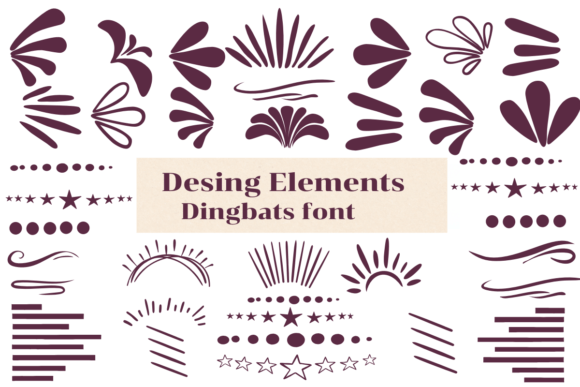
When it comes to creating visually appealing and creative projects, the right font can make all the difference. Design Elements Font is a dingbats font with a theme that features a sketch style, perfect for adding a personal touch to your wedding invitations, DIY crafts, decorations, logos, and many other creative ideas. In this article, we’ll explore the world of Design Elements Font and how it can enhance your creative projects.
What is Design Elements Font?
Design Elements Font is a unique dingbats font that features a sketch style theme. Dingbats fonts, also known as symbol fonts, are a type of font that consists of symbols, shapes, and icons rather than letters and numbers. Design Elements Font is specifically designed to provide users with a wide range of creative and decorative elements to enhance their projects.
Characteristics of Design Elements Font
Design Elements Font has several characteristics that make it an ideal choice for creative projects. Some of its key features include:
- Sketch style: The font features a sketch style theme, which gives it a hand-drawn and informal look.
- Wide range of symbols: Design Elements Font includes a wide range of symbols, shapes, and icons that can be used to create unique and creative designs.
- Easy to use: The font is easy to use and can be installed on your computer or used online.
- Versatile: Design Elements Font can be used for a variety of creative projects, including wedding invitations, DIY crafts, decorations, logos, and more.
Uses of Design Elements Font
Design Elements Font is a versatile font that can be used for a wide range of creative projects. Some of the most popular uses of the font include:
- Wedding invitations: The font’s sketch style theme and wide range of symbols make it perfect for creating unique and personalized wedding invitations.
- DIY crafts: Design Elements Font can be used to create custom labels, cards, and other decorative elements for DIY crafts.
- Decorations: The font can be used to create custom signs, banners, and other decorative elements for parties, events, and special occasions.
- Logos: Design Elements Font can be used to create unique and creative logos for businesses, organizations, and personal projects.
Benefits of Using Design Elements Font
Using Design Elements Font can provide several benefits for your creative projects. Some of the most significant advantages of using the font include:
- Unique and creative designs: The font’s sketch style theme and wide range of symbols allow you to create unique and creative designs that stand out from the crowd.
- Easy to use: Design Elements Font is easy to use and can be installed on your computer or used online, making it accessible to users of all skill levels.
- Time-saving: The font’s wide range of symbols and shapes can save you time and effort when creating designs, as you can easily find the elements you need.
- Cost-effective: Design Elements Font is a cost-effective solution for creating unique and creative designs, as you can use it for a wide range of projects without having to purchase multiple fonts.
How to Use Design Elements Font
Using Design Elements Font is easy and straightforward. Here are the steps to follow:
- Download and install the font: You can download Design Elements Font from a reputable font website or purchase it from a font foundry. Once downloaded, install the font on your computer.
- Choose a design project: Decide on a creative project you want to work on, such as a wedding invitation or DIY craft.
- Open your design software: Open your design software, such as Adobe Illustrator or Canva, and create a new project.
- Select the font: Select Design Elements Font from your font library and start typing or inserting symbols.
- Customize your design: Customize your design by adjusting the size, color, and style of the font, as well as adding other design elements.
Tips and Tricks for Using Design Elements Font
Here are some tips and tricks for using Design Elements Font:
- Experiment with different symbols: Don’t be afraid to experiment with different symbols and shapes to create unique and creative designs.
- Combine with other fonts: Combine Design Elements Font with other fonts to create interesting and contrasting designs.
- Adjust the size and color: Adjust the size and color of the font to suit your design needs.
- Use for digital and print projects: Use Design Elements Font for both digital and print projects, such as social media graphics, flyers, and brochures.
Design Elements Font: Access Download Now
| Font Name | Design Elements Font |
| Author | Unknown |
| Download | Access Download Here |
Conclusion
Design Elements Font is a unique and versatile dingbats font that features a sketch style theme. With its wide range of symbols, shapes, and icons, it’s perfect for creating unique and creative designs for wedding invitations, DIY crafts, decorations, logos, and many other creative projects. By following the tips and tricks outlined in this article, you can unlock the full potential of Design Elements Font and take your creative projects to the next level.
