
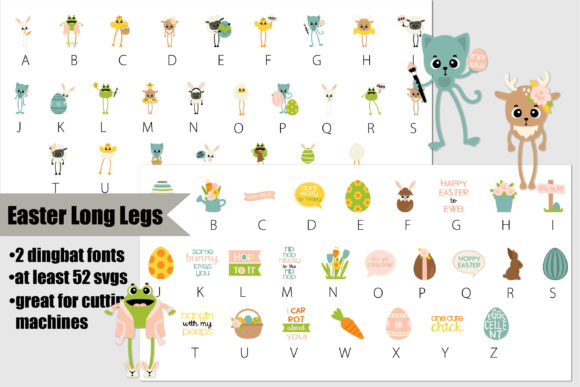
Easter Long Legs Font: A Comprehensive Guide to Enhancing Your Easter Designs
As Easter approaches, designers and crafters are on the lookout for unique and festive elements to make their projects stand out. One exciting addition to your Easter design toolkit is the Easter Long Legs Font, a full-color dingbat bundle featuring long-legged Easter and spring animals, along with Easter-themed elements in two different colorful dingbat fonts. In this article, we’ll explore the features of this innovative font, its compatibility with various design software, and provide a guide on how to make the most of this fantastic resource.
What is Easter Long Legs Font?
The Easter Long Legs Font is a distinctive and versatile design asset that combines the charm of Easter and spring with the creativity of dingbat fonts. This bundle includes:
- Long-legged Easter and spring animals
- Easter-themed elements
- Two different colorful dingbat fonts
All of these elements are presented in a full-color format, allowing for an explosion of color and creativity in your designs. Whether you’re creating Easter cards, decorations, or digital content, this font bundle provides a wide range of possibilities.
Key Features of Easter Long Legs Font
1. Full-Color Dingbat Bundle
The Easter Long Legs Font is a full-color dingbat bundle, meaning it includes a collection of graphical symbols and icons that can be used in place of traditional text. This bundle features long-legged Easter and spring animals, as well as Easter-themed elements, all in vibrant colors.
2. Two Colorful Dingbat Fonts
With two different colorful dingbat fonts included in the bundle, designers have the flexibility to choose the style that best suits their project. Whether you’re looking for something playful and whimsical or more elegant and refined, the Easter Long Legs Font has you covered.
3. Compatibility with Major Design Software
This product is a color font (Opentype-SVG) and is compatible with a range of popular design software, including:
- PhotoShop
- Illustrator
- Silhouette
- Inkscape
However, it’s essential to note that the OTF and/or TTF files of this product are not compatible with Cricut. But don’t worry, we’ll cover how to work with this font in various software later on.
How to Use Easter Long Legs Font: A Step-by-Step Guide
Step 1: Download and Install the Font
After purchasing the Easter Long Legs Font, download the file and follow the installation instructions for your operating system. For both Mac and Windows, this typically involves opening the downloaded file and following the prompts to install the font.
Step 2: Accessing the Font in Your Design Software
Once the font is installed, you can access it in your design software. The process may vary slightly depending on the program you’re using:
- PhotoShop: Open PhotoShop, create a new document or open an existing one, and select the text tool. Click on the font dropdown menu and select the Easter Long Legs Font.
- Illustrator: Launch Illustrator, create a new document or open an existing one, and select the text tool. Click on the font dropdown menu and select the Easter Long Legs Font.
- Silhouette: Open Silhouette Studio, create a new project or open an existing one, and select the text tool. Click on the font dropdown menu and select the Easter Long Legs Font.
- Inkscape: Open Inkscape, create a new document or open an existing one, and select the text tool. Click on the font dropdown menu and select the Easter Long Legs Font.
Step 3: Working with the Color Font
Since the Easter Long Legs Font is a color font (Opentype-SVG), you can use it in software that supports this format. When working with the font, you may need to adjust settings within your design software to ensure the colors are displayed correctly.
Step 4: Tips for Getting the Most Out of Easter Long Legs Font
Here are some tips to help you make the most of this fantastic font:
- Experiment with different colors and combinations to create unique Easter designs.
- Use the long-legged Easter and spring animals to add a whimsical touch to your projects.
- Incorporate Easter-themed elements to give your designs a festive feel.
- Combine the Easter Long Legs Font with other design elements, such as patterns and textures, to create visually appealing projects.
Ultimate Font Guide: Getting Started with Color Fonts
For those new to working with color fonts, it’s essential to understand the basics. Our Ultimate Font Guide provides comprehensive information on how to use color fonts, including:
- What are color fonts?
- How to install color fonts
- How to use color fonts in various design software
- Tips for working with color fonts
By consulting our Ultimate Font Guide, you’ll be able to get started with the Easter Long Legs Font and make the most of its features.
Easter Long Legs Font: Access Download Now
| Font Name | Easter Long Legs Font |
| Author | Illustration Ink |
| Download | Access Download Here |
Conclusion
The Easter Long Legs Font is a fantastic resource for designers and crafters looking to add a touch of Easter magic to their projects. With its full-color dingbat bundle, two colorful dingbat fonts, and compatibility with major design software, this font bundle offers endless possibilities for creative expression. By following our step-by-step guide and consulting our Ultimate Font Guide, you’ll be able to unlock the full potential of the Easter Long Legs Font and create stunning Easter designs that will delight and inspire.
