
Introducing Efflorescence Font: A Vibrant and Whimsical Full-Color Font
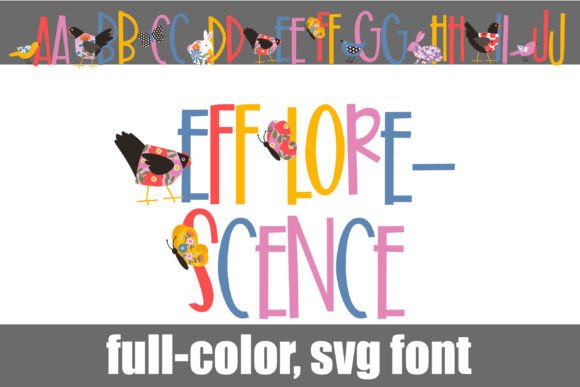
Are you looking for a unique and eye-catching font to add a touch of personality to your designs? Look no further than the Efflorescence Font, a fun and playful full-color font that features sans serif lettering with spring florals and animals/bugs on each letter. In this article, we’ll take a closer look at the Efflorescence Font, its features, and how to install and use it in your designs.
Key Features of Efflorescence Font
- Fun sans serif lettering with spring florals and animals/bugs on each letter
- Available in full-color (SVG) format
- Alt case available with additional colors of each letter
- Installed like any normal .otf font
- Compatible with Adobe products, Silhouette Studio, Quark, and Inkscape, amongst others
A Closer Look at the Font
The Efflorescence Font is a one-of-a-kind font that combines fun sans serif lettering with colorful spring florals and animals/bugs on each letter. The font is available in full-color (SVG) format, which allows for vibrant and detailed designs. The alt case version of the font offers additional colors of each letter, giving you even more creative possibilities.
📸 Preview Images

💡 Click on any image to view full size
The font is perfect for designers who want to add a touch of whimsy and personality to their designs. Whether you’re creating invitations, greeting cards, or social media graphics, the Efflorescence Font is sure to make your designs stand out.
How to Install the Efflorescence Font
Installing the Efflorescence Font is easy and straightforward. The font can be installed like any normal .otf font, using FontBook for Mac users or via your preferred font manager or Control Panel in Windows.
Here are the steps to install the font:
- Download the font file from a reputable source
- Open FontBook on Mac or your preferred font manager on Windows
- Click on the “+” icon to add a new font
- Select the downloaded font file and click “Install”
Program Compatibility
Not all programs support full-color SVG fonts, so it’s essential to check compatibility before using the Efflorescence Font. Programs that support full-color SVG fonts include:
- Adobe products (e.g., Photoshop, Illustrator, InDesign)
- Silhouette Studio
- Quark
- Inkscape
If you’re using a program that doesn’t support full-color SVG fonts, the font will appear as black. However, if your program supports color fonts, you’ll see the vibrant colors of the Efflorescence Font when you type on the document.
Tips for Using the Efflorescence Font
Here are some tips for using the Efflorescence Font in your designs:
- Use the font for creative and playful designs, such as invitations, greeting cards, and social media graphics
- Experiment with different colors and combinations of letters to create unique designs
- Pair the font with other fonts to create a contrasting look
- Use the alt case version of the font to add more colors and creativity to your designs
Troubleshooting Common Issues
If you’re experiencing issues with the Efflorescence Font, here are some common problems and solutions:
- Font not showing in color: Check if your program supports full-color SVG fonts. If not, try using a different program or converting the font to a different format.
- Font not installing: Check if the font file is corrupted or if you’ve installed it correctly. Try reinstalling the font or contacting the font supplier for support.
Efflorescence Font: Access Download Now
| Font Name | Efflorescence Font |
| Author | Illustration Ink |
| Download | Access Download Here |
Conclusion
The Efflorescence Font is a unique and creative full-color font that can add a touch of personality to your designs. With its fun sans serif lettering, colorful spring florals, and animals/bugs on each letter, this font is perfect for designers who want to create playful and eye-catching designs. By following the installation guide and tips outlined in this article, you can start using the Efflorescence Font in your designs and take your creativity to the next level.
