
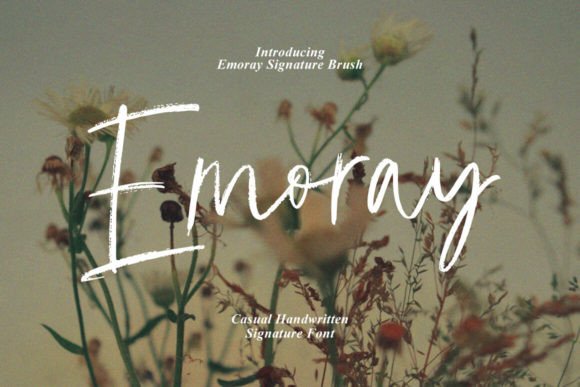
Emoray Font: A Handmade Signature Style for Creative Designs
The Emoray Font is a unique and creative typeface that offers a handmade signature style, decorative characters, and a dancing baseline. This beautiful font is perfect for designing invitation cards, greeting cards, branding materials, business cards, quotes, posters, and more. With its elegant and artistic look, Emoray Font is sure to make your designs stand out.
What Makes Emoray Font Special?
Emoray Font is a signature brush font that features a distinctive handmade style. The font comes with 130+ glyphs, including alternative characters that can be accessed using Open Type features. These features include Swash, Stylistic Sets, Stylistic Alternates, and Ligature, which can be easily accessed using Open Type savvy programs such as Adobe Illustrator, Adobe InDesign, Adobe Photoshop, Corel Draw X version, and Microsoft Word.
📸 Preview Images


💡 Click on any image to view full size
Key Features of Emoray Font:
- Handmade signature style
- Decorative characters
- Dancing baseline
- 130+ glyphs
- Open Type features: Swash, Stylistic Sets, Stylistic Alternates, and Ligature
- PUA unicode (specially coded fonts)
How to Access Open Type Features
To access the Open Type features of Emoray Font, you will need to use a program that supports Open Type. Some of the most popular programs that support Open Type include:
Supported Software:
- Adobe Illustrator
- Adobe InDesign
- Adobe Photoshop
- Corel Draw X version
- Microsoft Word
Once you have opened Emoray Font in one of these programs, you can access the Open Type features by following these steps:
- Select the text you want to edit
- Go to the “Window” menu and select “Typography”
- In the Typography window, click on the “Open Type” tab
- From here, you can access the various Open Type features, including Swash, Stylistic Sets, Stylistic Alternates, and Ligature
What is PUA Unicode?
PUA (Private Use Area) unicode is a special coding system that allows designers to access a wide range of characters and glyphs in a font. In the case of Emoray Font, the PUA unicode allows designers to access the alternative characters and glyphs that are included in the font.
The PUA unicode system is useful for designers because it allows them to access a wide range of characters and glyphs without having to use complex keyboard shortcuts or character maps. With Emoray Font, the PUA unicode system makes it easy to access the various Open Type features and to create beautiful, unique designs.
Uses for Emoray Font
Emoray Font is a versatile font that can be used for a wide range of design projects. Some of the most popular uses for Emoray Font include:
Design Projects:
- Invitation cards
- Greeting cards
- Branding materials
- Business cards
- Quotes
- Posters
- Brochures
- Logos
With its elegant and artistic look, Emoray Font is sure to make your designs stand out. Whether you are a professional designer or a DIY enthusiast, Emoray Font is a great choice for any design project.
Emoray Font: Access Download Now
| Font Name | Emoray Font |
| Author | Unknown |
| Download | Access Download Here |
Conclusion
In conclusion, Emoray Font is a unique and creative typeface that offers a handmade signature style, decorative characters, and a dancing baseline. With its Open Type features and PUA unicode system, Emoray Font is a versatile font that can be used for a wide range of design projects. Whether you are a professional designer or a DIY enthusiast, Emoray Font is a great choice for any design project.
Font Details:
- Font Name: Emoray Font
- Font Style: Handmade Signature Brush
- Glyphs: 130+
- Open Type Features: Swash, Stylistic Sets, Stylistic Alternates, and Ligature
- PUA Unicode: Yes
