
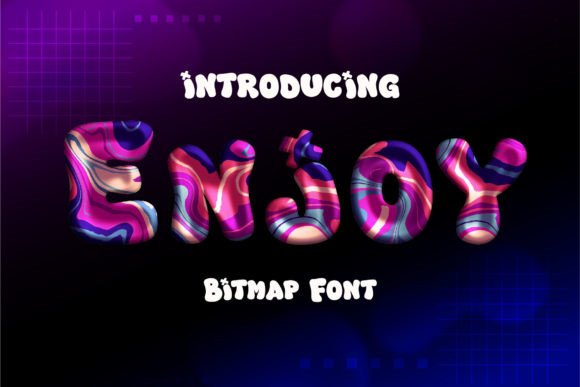
Discover the Delightful Enjoy Font: Elevate Your Designs with a Cute and Fun Color Font
Are you on the lookout for a font that can add a touch of personality and whimsy to your designs? Look no further than the Enjoy Font, a cute and fun color font that’s sure to capture your heart. With its authentic feel and versatility, this beautiful font is perfect for creating stunning invitations, gorgeous stationery art, eye-catching social media posts, and adorable greeting cards.
What Makes Enjoy Font So Special?
- Cute and Fun Design: Enjoy Font boasts a playful and charming design that’s sure to add a dash of personality to your creations.
- Authentic Feel: This font’s authentic feel makes it perfect for creating designs that resonate with your audience.
- Color Font: Unlike traditional fonts, Enjoy Font comes in a range of colors, allowing you to add an extra layer of depth and visual interest to your designs.
- Versatile: Whether you’re creating invitations, social media posts, or greeting cards, Enjoy Font is the perfect choice.
How to Use Enjoy Font to Elevate Your Designs
Adding Enjoy Font to your creative projects is easy. Simply download the font, install it on your computer, and start using it in your favorite design software. Here are a few tips to get you started:
- Invitations: Use Enjoy Font to create stunning invitations for weddings, birthday parties, and other special occasions.
- Stationery Art: Add a touch of personality to your stationery art with Enjoy Font’s playful and colorful design.
- Social Media Posts: Make your social media posts stand out with Enjoy Font’s eye-catching design.
- Greeting Cards: Create adorable greeting cards for friends and family using Enjoy Font.
Technical Tips for Using Enjoy Font
Here are a few technical tips to help you get the most out of Enjoy Font:
- Photoshop: To change the font color in Photoshop, right-click on the layer and select Rasterize Type. Then, press Ctrl+U and click on Colorize to change the color.
- Illustrator: To change the font color in Illustrator, select the font you want to change, go to Object > Rasterize, set the resolution to High (300 dpi), and select Transparent. Then, go to Edit > Edit Colors > Adjust Colors to change the color.
IMPORTANT: OpenType-SVG bitmap is currently visible only in a few apps like Photoshop CC2017 and Over, Illustrator CC 2018+, Indesign CC 2019+, and MacOS native apps (FontBook Pages, Keynote). Unfortunately, it’s not supported in Photoshop CC 2015 or older.
Note for Canva Users: Canva does not support color fonts, so you won’t be able to use Enjoy Font directly in Canva.
The Benefits of Using Enjoy Font
So, why should you choose Enjoy Font for your designs? Here are just a few benefits:
- Unique Designs: Enjoy Font allows you to create unique and eye-catching designs that will set you apart from the crowd.
- Time-Saving: With Enjoy Font, you can create stunning designs in no time, saving you time and effort.
- Easy to Use: Enjoy Font is easy to use, even for those who are new to design.
- Versatile: Enjoy Font can be used for a wide range of design projects, from invitations to social media posts.
Enjoy Font: Access Download Now
| Font Name | Enjoy Font |
| Author | Fox7 |
| Download | Access Download Here |
Conclusion
In conclusion, Enjoy Font is a cute and fun color font that’s perfect for adding a touch of personality to your designs. With its authentic feel, versatility, and range of colors, this beautiful font is sure to elevate your creations and make them stand out. Whether you’re a designer, artist, or simply someone who loves to create, Enjoy Font is a must-have font in your collection.
Final Thoughts
So, what are you waiting for? Download Enjoy Font today and start creating stunning designs that will leave a lasting impression. With its ease of use, versatility, and range of colors, Enjoy Font is the perfect choice for anyone looking to add a touch of personality to their designs.
