
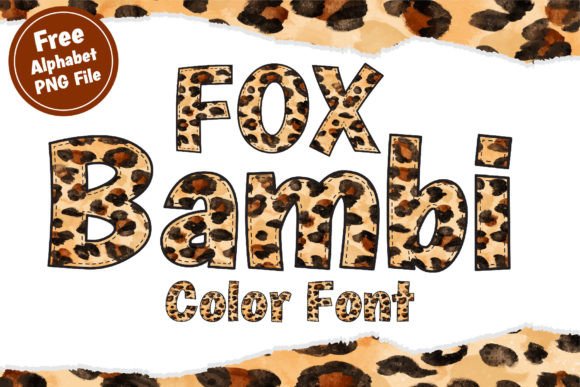
Introducing Fox Bambi Font: The Ultimate Decorative Color Font for Creative Designs
Are you looking for a font that can add a touch of fun and coolness to your designs? Look no further than the Fox Bambi Font! This decorative color font is perfect for creating eye-catching designs for various projects, including t-shirts, tote bags, hats, stickers, wedding designs, logos, cards, quotes, and more. In this article, we’ll explore the features and benefits of the Fox Bambi Font and provide a comprehensive guide on how to use it.
Key Features of Fox Bambi Font
- Decorative Color Font: Fox Bambi is a vibrant and playful font that adds a pop of color to your designs.
- OpenType Full-Color (SVG) Fonts: This font is compatible with various design software, including Adobe Creative Cloud applications.
- Alphabet PNG File: The font comes with an alphabet PNG file, making it easy to use in various design projects.
- Easy to Install: Installing the font is a breeze, and it can be done via FontBook for Mac users or via your preferred font manager or Control Panel in Windows.
Software Compatibility
Fox Bambi Font is compatible with various design software, including:
📸 Preview Images

💡 Click on any image to view full size
- Adobe Photoshop (CC 2017 and later)
- Adobe Illustrator (CC 2018 and later)
- Adobe InDesign (CC 2019 and later)
- Inkscape
- QuarkXPress (2018 and later)
- Pixelmator
- Sketch
- Affinity Designer (macOS 10.14 Mojave and later)
- Paint.NET (Windows only)
Please note that Canva does not support color fonts, and the font may show as black in non-compatible programs.
Design Ideas with Fox Bambi Font
Fox Bambi Font is a versatile font that can be used in various design projects. Here are some ideas to get you started:
- T-Shirts and Apparel: Create eye-catching t-shirt designs for your brand or business.
- Tote Bags and Accessories: Design colorful tote bags, hats, and stickers that make great promotional products.
- Wedding Designs: Use Fox Bambi Font to create beautiful wedding invitations, cards, and decorations.
- Logos and Branding: Create a unique and memorable logo for your business or brand.
- Cards and Quotes: Design inspiring quote cards, greeting cards, and postcards that make great social media content.
How to Install Fox Bambi Font
Installing Fox Bambi Font is easy! Here’s a step-by-step guide:
- Download the font file from a trusted source.
- For Mac users, open FontBook and click on “File” > “Add Fonts.”
- Select the font file and click “Open.”
- For Windows users, open the Control Panel and navigate to “Fonts.”
- Drag and drop the font file into the Fonts folder.
- Restart your design software and start using Fox Bambi Font!
Tips and Tricks for Using Fox Bambi Font
Here are some tips and tricks to help you get the most out of Fox Bambi Font:
- Experiment with Colors: Try out different color combinations to create unique and eye-catching designs.
- Mix and Match Fonts: Pair Fox Bambi Font with other fonts to create interesting and dynamic designs.
- Use in Combination with Images: Use Fox Bambi Font with images to create stunning and engaging designs.
- Pay Attention to Legibility: Make sure to adjust the font size and color to ensure legibility.
Fox Bambi Font: Access Download Now
| Font Name | Fox Bambi Font |
| Author | Fox7 |
| Download | Access Download Here |
Conclusion
In conclusion, Fox Bambi Font is a fun and decorative color font that’s perfect for creative designs. With its compatibility with various design software and ease of installation, it’s a great addition to any designer’s toolkit. Whether you’re designing t-shirts, logos, or wedding decorations, Fox Bambi Font is sure to make your designs stand out!
