
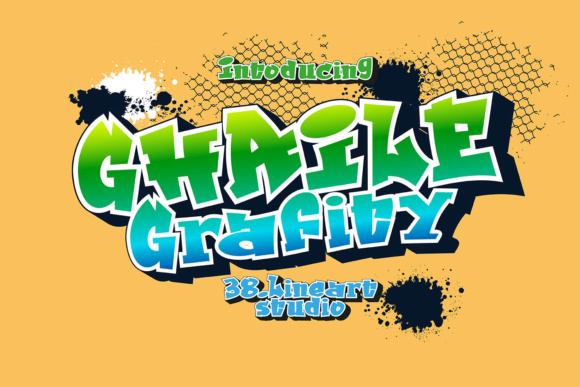
Ghaile Grafiti Font: Unleash Your Creativity with this Graffiti-Style Handwritten Font
Are you looking for a unique and creative font to add a touch of personality to your designs? Look no further than the Ghaile Grafiti Font, a graffiti-style handwritten font that is sure to make your projects stand out. In this article, we’ll take a closer look at the Ghaile Grafiti Font, its features, and how you can use it to take your designs to the next level.
What is Ghaile Grafiti Font?
The Ghaile Grafiti Font is a graffiti-style handwritten font that is designed to give your text a bold, edgy look. It’s perfect for designers who want to add a touch of street art to their projects, or for anyone who wants to create eye-catching text that stands out from the crowd. The font includes three variations, giving you the ultimate package to create a real graffiti style.
Features of Ghaile Grafiti Font
The Ghaile Grafiti Font comes with three variations, each with its own unique characteristics. The three variations are:
- Outline Version: The outline version has a fixed kerning as a single text, making it great for crafting designs. This version is perfect for creating bold, outlined text that really makes an impact.
- Solid Version: The solid version is perfect for creating filled-in text that looks like it was spray-painted on a wall. To get the best results with this version, make sure to set the glyph tracking to -70 (A/V:-70).
- Mix and Match: One of the best things about the Ghaile Grafiti Font is that you can mix and match the three variations to create a real graffiti style. Experiment with different combinations to find the look that works best for your project.
Using Ghaile Grafiti Font in Your Designs
The Ghaile Grafiti Font is incredibly versatile and can be used in a wide range of design projects. Here are a few ideas to get you started:
- Posters and Flyers: Use the Ghaile Grafiti Font to create eye-catching posters and flyers that really grab people’s attention.
- Social Media Graphics: Add a touch of personality to your social media graphics with the Ghaile Grafiti Font. It’s perfect for creating bold, eye-catching text that stands out on crowded social media feeds.
- Logos and Branding: The Ghaile Grafiti Font can also be used to create unique and memorable logos and branding materials. Its bold, edgy look is perfect for companies that want to stand out from the crowd.
Tips and Tricks for Getting the Most out of Ghaile Grafiti Font
Here are a few tips and tricks to help you get the most out of the Ghaile Grafiti Font:
- Experiment with Different Colors: The Ghaile Grafiti Font looks great in a wide range of colors, so don’t be afraid to experiment and find the color scheme that works best for your project.
- Play with Texture and Patterns: Adding texture and patterns to your text can really make it pop. Try combining the Ghaile Grafiti Font with different textures and patterns to create a unique look.
- Mix and Match Fonts: Don’t be afraid to mix and match the Ghaile Grafiti Font with other fonts to create a unique look. The font’s bold, edgy look pairs well with a wide range of other fonts.
Ghaile Grafiti Font: Access Download Now
| Font Name | Ghaile Grafiti Font |
| Author | Unknown |
| Download | Access Download Here |
Conclusion
The Ghaile Grafiti Font is a unique and creative font that is sure to add a touch of personality to your designs. With its three variations and bold, edgy look, it’s perfect for designers who want to create eye-catching text that really makes an impact. Whether you’re working on a poster, social media graphic, or logo, the Ghaile Grafiti Font is a great choice. So why not give it a try and see what you can create?
Download Ghaile Grafiti Font
Ready to get started with the Ghaile Grafiti Font? You can download the font from [insert link here]. With its easy-to-use design and versatile features, it’s the perfect addition to any designer’s toolkit.
Ghaile Grafiti Font Specifications
- Font Type: Graffiti-style handwritten font
- Variations: 3 variations (outline, solid, and mix-and-match)
- File Format: [Insert file format here]
- Language: [Insert language here]
