
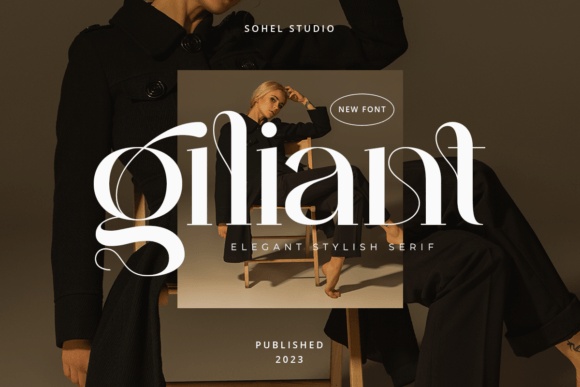
Giliant Font: The Epitome of Modern Elegance
In the realm of typography, a font can make or break the visual appeal of a design. For those seeking a modern, elegant, and luxurious feel, the Giliant Font is an exceptional choice. This serif typeface boasts unique alternatives, multilingual support, and impeccable kerning, making it perfect for a wide range of applications.
Key Features of Giliant Font
- Modern Elegant Serif Typeface: Giliant Font is designed with a contemporary aesthetic, offering a fresh take on traditional serif fonts.
- Unique Alternative: Its distinct style sets it apart from more common typefaces, providing a unique touch to any design.
- Multilingual Support: Catering to a global audience, Giliant Font supports multiple languages, making it versatile for international projects.
- Perfect Kerning: The font’s kerning is meticulously crafted to ensure optimal readability and aesthetic appeal.
Ideal Applications for Giliant Font
Giliant Font’s versatility makes it suitable for a myriad of design projects. Here are some ideas to get you started:
- Elegant & Luxury Logo: Create a lasting impression with a logo that exudes sophistication and class.
- Classy Editorial Design: Elevate your magazine or newspaper with a refined and elegant typographic style.
- Women’s Magazine: The font’s modern elegance is particularly well-suited for publications targeting a female audience.
- Fashion Brand: Communicate your brand’s luxury and style with Giliant Font.
- Cosmetic Brand: Perfect for packaging, advertising, and promotional materials in the beauty industry.
- Fashion Promotion: Use Giliant Font to create eye-catching promotional materials that stand out.
- Modern Advertising Design: Its unique style ensures your ads will capture attention and convey a sense of modernity.
- Invitation Card: Make your invitations memorable with a touch of elegance.
- Art Quote: Highlight artistic expressions with a font that complements creativity.
- Home Decoration: Use Giliant Font for catalogues, price lists, or any printed materials to add a sophisticated touch.
- Book/Cover Titles: Give your book a distinguished look with an elegant font.
- Special Events: Ideal for event branding, including weddings, galas, and corporate events.
- Tote Bag, T-shirt: Add a stylish quote or message to merchandise.
- Advertising: Stand out in any form of advertising with a distinctive typeface.
Tips for Using Giliant Font Effectively
To maximize the impact of Giliant Font, consider the following tips:
- Pairing: Experiment with font pairings to complement Giliant Font. It works well with both sans-serif and script fonts.
- Size Matters: Play with different sizes to create visual hierarchy and emphasize key messages.
- Color Selection: Choose colors that reflect the brand’s personality or the mood you want to convey.
- Spacing: Don’t underestimate the power of white space. It can enhance readability and overall aesthetics.
Downloading and Licensing Giliant Font
Interested in using Giliant Font for your project? Here’s what you need to know:
- Source: Obtain the font from reputable font foundries or marketplaces.
- License Types: Understand the licensing terms, which may vary depending on the intended use (personal, commercial, etc.).
- File Formats: Ensure you receive the font in compatible formats for your design software.
Giliant Font: Access Download Now
| Font Name | Giliant Font |
| Author | Unknown |
| Download | Access Download Here |
Conclusion
Giliant Font stands out as a versatile and elegant typeface suitable for a wide range of design applications. Its modern aesthetic, combined with unique alternatives and multilingual support, makes it an excellent choice for designers looking to add a touch of luxury and sophistication to their projects. By understanding its features and how to use it effectively, you can elevate your designs and make a lasting impression on your audience.
Additional Resources
For more information on typography and design, explore:
- Typography guides and tutorials
- Design blogs and communities
- Font pairing tools
