
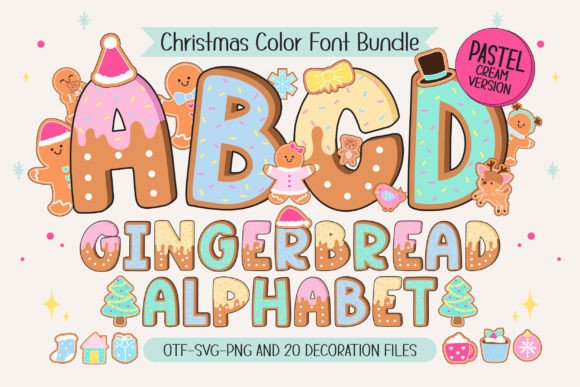
Gingerbread Pastel Cream Font: A Sweet and Playful Christmas Font
Are you looking for a font that captures the essence of Christmas and adds a touch of whimsy to your holiday creations? Look no further than the Gingerbread Pastel Cream Font, a charming and festive font inspired by gingerbread cookies topped with soft pastel cream.
What is Gingerbread Pastel Cream Font?
Gingerbread Pastel Cream is a Christmas-themed font that features four pastel color styles, each one more delightful than the last. This font is perfect for adding a gentle, festive touch to your Christmas posters, T-shirts, branding, custom DIY craft projects, quotes, personalized names, and more.
The font comes with 20 bonus matching clip arts, making it a versatile and fun addition to your design toolkit. Whether you’re a designer, a crafty DIY enthusiast, or just someone who loves the holiday season, Gingerbread Pastel Cream is sure to bring a warm and whimsical vibe to all your holiday creations.
Key Features of Gingerbread Pastel Cream Font
- Four Pastel Color Styles: The font features four different pastel color styles, each one inspired by the soft, creamy colors of gingerbread cookies.
- 20 Bonus Clip Arts: The font comes with 20 matching clip arts, perfect for adding a fun and festive touch to your designs.
- Compatible with Popular Design Programs: The color version of the font is compatible with popular design programs like PhotoShop, Illustrator, Silhouette, and Inkscape.
- Black Version Compatible with Cricut: The black version of the font is compatible with Cricut Design Space and other cutting machines.
Using Gingerbread Pastel Cream Font in Your Designs
Gingerbread Pastel Cream is a versatile font that can be used in a variety of design projects, from Christmas posters and T-shirts to custom DIY craft projects and more. Here are a few ideas to get you started:
- Christmas Posters: Use Gingerbread Pastel Cream to create festive Christmas posters that are sure to delight your friends and family.
- T-Shirts and Apparel: Add a fun and festive touch to your holiday T-shirts and apparel with Gingerbread Pastel Cream.
- Custom DIY Craft Projects: Use Gingerbread Pastel Cream to add a personal touch to your custom DIY craft projects, such as holiday cards, gift tags, and more.
- Branding and Marketing: Use Gingerbread Pastel Cream to add a touch of whimsy and fun to your holiday branding and marketing materials.
Tips for Using Gingerbread Pastel Cream Font
Here are a few tips for getting the most out of Gingerbread Pastel Cream:
- Experiment with Different Colors: Try out different color combinations to find the perfect look for your design.
- Use the Clip Arts: Don’t forget to use the 20 bonus clip arts that come with the font to add a fun and festive touch to your designs.
- Pair with Other Fonts: Try pairing Gingerbread Pastel Cream with other fonts to create a unique and interesting look.
Technical Details
Here are a few technical details to keep in mind when using Gingerbread Pastel Cream:
- File Format: The font comes in OTF and/or TTF file format.
- Compatibility: The color version of the font is compatible with PhotoShop, Illustrator, Silhouette, and Inkscape. The black version is compatible with Cricut Design Space and other cutting machines.
Gingerbread Pastel Cream Font: Access Download Now
| Font Name | Gingerbread Pastel Cream Font |
| Author | Issie_Studio |
| Download | Access Download Here |
Conclusion
Gingerbread Pastel Cream Font is a sweet and playful Christmas font that’s perfect for adding a gentle, festive touch to your holiday creations. With its four pastel color styles, 20 bonus clip arts, and compatibility with popular design programs, this font is sure to bring a warm and whimsical vibe to all your holiday designs.
Frequently Asked Questions
- What is the difference between the color and black versions of the font? The color version of the font features four pastel color styles, while the black version is a single-color font.
- Is the font compatible with Cricut Design Space? The black version of the font is compatible with Cricut Design Space, but the color version is not.
- How do I use the font in my design program? Please see our Ultimate Font Guide for more information on how to use this type of font in your design program.
