
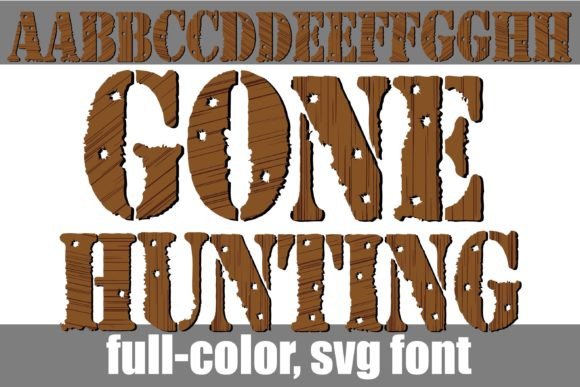
Gone Hunting Font: A Unique Full-Color Font for Creative Projects
The Gone Hunting Font is a distinctive and eye-catching full-color font that mimics wooden lettering with bullet holes throughout. This font is perfect for creative projects that require a rustic, outdoorsy feel. In this article, we’ll explore the features and benefits of the Gone Hunting Font, as well as provide a comprehensive guide on how to install and use it.
Key Features of the Gone Hunting Font
- Full-color font: The Gone Hunting Font is a full-color OpenType font that uses SVG (Scalable Vector Graphics) technology to display vibrant colors.
- Wooden lettering with bullet holes: The font features a unique design that resembles wooden lettering with bullet holes throughout, giving it a rustic and outdoorsy feel.
- OpenType full-color (SVG) fonts: The font is installed like any normal .otf font, making it easy to use and integrate into your creative projects.
How to Install the Gone Hunting Font
Installing the Gone Hunting Font is a straightforward process that can be completed in a few steps. Here’s a step-by-step guide:
📸 Preview Images

💡 Click on any image to view full size
- Mac Users: For Mac users, the font can be installed via FontBook. Simply open FontBook, select the font file, and click “Install Font”.
- Windows Users: For Windows users, the font can be installed via the Control Panel. Go to the Control Panel, select “Fonts”, and then click “File” > “Install Font”.
- Font Manager: Alternatively, you can use a font manager like Adobe Font Manager or Suitcase Fusion to install and manage your fonts.
Compatibility with Creative Programs
Not all programs support full-color SVG fonts, so it’s essential to check compatibility before using the Gone Hunting Font. Here are some popular programs that support full-color SVG fonts:
- Adobe Products: Adobe products, such as Photoshop, Illustrator, and InDesign, support full-color SVG fonts.
- Silhouette Studio: Silhouette Studio, a popular cutting software, supports full-color SVG fonts.
- Quark: Quark, a professional design software, supports full-color SVG fonts.
- Inkscape: Inkscape, a free and open-source vector graphics editor, supports full-color SVG fonts.
If you’re using a program that doesn’t support full-color SVG fonts, the Gone Hunting Font may appear as a black font. However, if your program supports color fonts, you’ll see the font in its full-color glory when you type on the document.
Tips for Using the Gone Hunting Font
Here are some tips for using the Gone Hunting Font in your creative projects:
- Pair with complementary fonts: Pair the Gone Hunting Font with complementary fonts to create a unique and visually appealing design.
- Experiment with colors: Experiment with different colors and textures to enhance the rustic feel of the font.
- Use for headlines and titles: Use the Gone Hunting Font for headlines and titles to add a touch of rustic charm to your design.
Troubleshooting Common Issues
If you’re experiencing issues with the Gone Hunting Font, here are some common problems and solutions:
- Font not displaying in color: Check if your program supports full-color SVG fonts. If not, try using a different program or converting the font to a different format.
- Font not installing: Check if the font file is corrupted or if you’ve installed it correctly. Try reinstalling the font or contacting the font manufacturer for support.
Gone Hunting Font: Access Download Now
| Font Name | Gone Hunting Font |
| Author | Illustration Ink |
| Download | Access Download Here |
Conclusion
The Gone Hunting Font is a unique and creative full-color font that’s perfect for adding a rustic touch to your design projects. With its easy installation process and compatibility with popular creative programs, it’s an excellent choice for designers, crafters, and DIY enthusiasts. By following the tips and guidelines outlined in this article, you can get the most out of the Gone Hunting Font and create stunning designs that showcase your creativity.
