
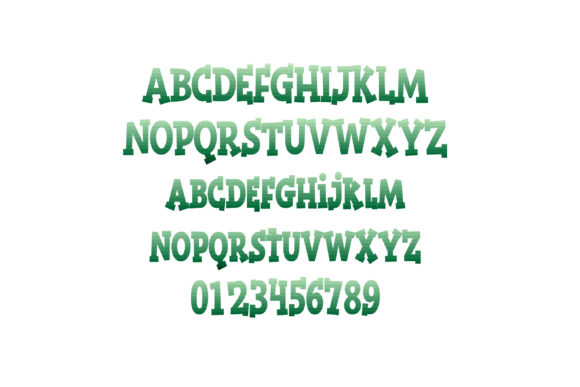
Introducing Gradient Green Font: A Stunning Full-Color Font
The world of typography has witnessed a significant transformation in recent years, with the emergence of full-color fonts that are redefining the way we experience text. One such font that has caught our attention is the Gradient Green Font, a beautiful, heavy serif font that features a gradient of greens. In this article, we’ll delve into the details of this stunning font, explore its features, and discuss how to install and use it.
What is Gradient Green Font?
Gradient Green Font is a full-color font that boasts heavy serif letters in a gradient of greens. This font is part of the OpenType full-color (SVG) font family, which allows for the creation of colorful, high-quality text that can be used in various design applications. The font’s gradient effect gives it a unique and eye-catching appearance, making it perfect for designers looking to add a touch of elegance and sophistication to their work.
How to Install Gradient Green Font
Installing Gradient Green Font is a straightforward process that can be completed in a few simple steps. The font can be installed like any normal .otf font, and the process varies depending on your operating system.
Mac Users:
Mac users can install the font using FontBook, which is a built-in font management tool. To install the font, follow these steps:
- Download the font file and save it to your computer.
- Open FontBook, which can be found in the Applications/Utilities folder.
- Click on the “+” button at the bottom of the FontBook window and select the font file.
- Click “Open” to install the font.
Windows Users:
Windows users can install the font using their preferred font manager or via the Control Panel. To install the font, follow these steps:
- Download the font file and save it to your computer.
- Open the Control Panel and navigate to the “Fonts” section.
- Click on “File” and select “Install new font.”
- Select the font file and click “OK” to install the font.
Color Font Compatibility
It’s essential to note that color fonts, including Gradient Green Font, may not display correctly in all programs. Non-compatible programs will show the font as black, which can be disappointing if you’re expecting to see the font’s beautiful gradient effect.
To ensure that you can view and use the font’s color features, you need to use a program that supports full-color SVG fonts. Some popular programs that support color fonts include:
- Adobe products (e.g., Photoshop, Illustrator, InDesign)
- Silhouette Studio
- Quark
- Inkscape
You can determine if your program supports color fonts by typing on a document and checking if the text appears in color. If the text shows as black, it’s likely that your program doesn’t support color fonts.
Benefits of Using Gradient Green Font
Gradient Green Font offers several benefits that make it an attractive choice for designers. Some of the benefits include:
- Unique and eye-catching appearance: The font’s gradient effect gives it a distinctive look that can help your designs stand out.
- Elegant and sophisticated: The font’s heavy serif letters and gradient effect give it an air of elegance and sophistication, making it perfect for designs that require a touch of luxury.
- Versatile: Gradient Green Font can be used in various design applications, including print, digital, and web design.
Tips and Tricks for Using Gradient Green Font
To get the most out of Gradient Green Font, here are some tips and tricks to keep in mind:
- Experiment with different font sizes: The font’s gradient effect can be more pronounced at larger font sizes, so experiment with different sizes to achieve the desired effect.
- Pair with neutral colors: Gradient Green Font can be paired with neutral colors like black, white, or gray to create a striking contrast.
- Use in combination with other fonts: The font can be used in combination with other fonts to create a unique and visually appealing typography.
Gradient Green Font: Access Download Now
| Font Name | Gradient Green Font |
| Author | Illustration Ink |
| Download | Access Download Here |
Conclusion
Gradient Green Font is a stunning full-color font that offers a unique and eye-catching appearance. With its heavy serif letters and gradient effect, it’s perfect for designers looking to add a touch of elegance and sophistication to their work. By following the installation guide and using a program that supports full-color SVG fonts, you can take advantage of the font’s beautiful gradient effect and create stunning designs.
