
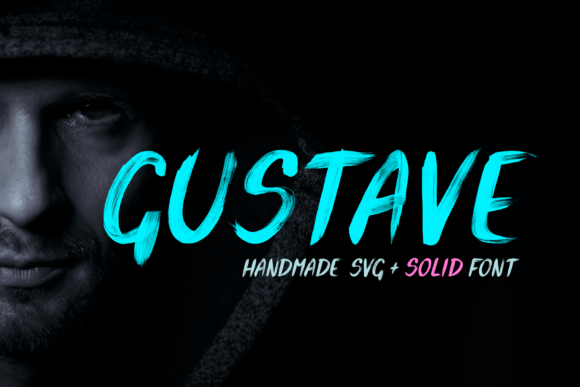
Gustave Font: Unleash Your Creativity with this Stunning All-Caps Brush Display Font
Are you tired of using the same old fonts in your designs? Look no further than Gustave Font, an all-caps brush display font that is sure to take your creations to the next level. Made using acrylic paint, Gustave Font is a unique and stylish font that is perfect for adding a touch of personality to your designs. But that’s not all – Gustave Font also comes with a special SVG font that contains all the realistic effects you need to create truly amazing designs.
The Story Behind Gustave Font
Gustave Font is more than just a font – it’s a work of art. Created with acrylic paint, this stunning all-caps brush display font is the perfect combination of style and creativity. The font is designed to look like it was hand-painted with a brush, giving it a unique and organic feel that is sure to capture the attention of your audience. Whether you’re a designer, artist, or simply someone who loves to create, Gustave Font is the perfect tool for unleashing your creativity.
📸 Preview Images

💡 Click on any image to view full size
The Power of Gustave Font’s SVG Companion
But what really sets Gustave Font apart is its SVG font companion. This special font contains all the realistic effects you need to create truly amazing designs. With the SVG font, you can add texture, depth, and dimension to your designs, making them look more realistic and engaging. The SVG font is also fully customizable, allowing you to adjust the effects to suit your needs.
What Makes Gustave Font So Special?
So, what makes Gustave Font so special? Here are just a few reasons why this font stands out from the rest:
- Unique and Stylish Design: Gustave Font has a one-of-a-kind design that is sure to make your designs stand out.
- Acrylic Paint Effect: The font is made to look like it was painted with acrylic paint, giving it a unique and organic feel.
- All-Caps Display Font: Gustave Font is an all-caps display font, making it perfect for headlines, titles, and other display text.
- SVG Font Companion: The SVG font companion adds an extra layer of realism and customization to your designs.
How to Use Gustave Font
Using Gustave Font is easy. Simply download the font and install it on your computer. Then, open your favorite design program and start typing away. The font is fully compatible with most design programs, including Adobe Illustrator, Photoshop, and Canva.
To get the most out of Gustave Font, try experimenting with different colors, textures, and effects. You can also use the SVG font companion to add extra depth and dimension to your designs.
Tips and Tricks for Getting the Most Out of Gustave Font
Here are a few tips and tricks for getting the most out of Gustave Font:
- Experiment with Different Colors: Try using different colors to create a unique and eye-catching design.
- Add Texture and Depth: Use the SVG font companion to add texture and depth to your designs.
- Play with Effects: Experiment with different effects, such as drop shadows and gradients, to add extra interest to your designs.
- Use Gustave Font for Headlines and Titles: Gustave Font is perfect for headlines and titles, so try using it to add a touch of personality to your designs.
Gustave Font: Access Download Now
| Font Name | Gustave Font |
| Author | Mint Pixels |
| Download | Access Download Here |
Conclusion
In conclusion, Gustave Font is a unique and stylish all-caps brush display font that is sure to take your designs to the next level. With its acrylic paint effect and SVG font companion, Gustave Font is the perfect tool for unleashing your creativity and creating truly amazing designs. So why wait? Download Gustave Font today and start creating!
Frequently Asked Questions
- What file formats does Gustave Font come in?: Gustave Font comes in OTF, TTF, and SVG file formats.
- Is Gustave Font compatible with my design program?: Gustave Font is compatible with most design programs, including Adobe Illustrator, Photoshop, and Canva.
- Can I use Gustave Font for commercial projects?: Yes, Gustave Font is licensed for commercial use.
- How do I install Gustave Font?: Simply download the font and follow the installation instructions for your operating system.
